Guides
Retool Workflows Custom npm Libraries: How to Use Any Package
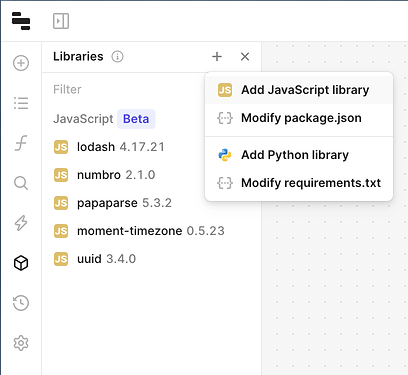
If you've hit the wall with Retool Workflows' preset library selection, the new Retool Workflows custom npm libraries beta is exactly what you've been waiting for. Instead of being locked into a fixed set of packages, you can now bring in any public npm package directly inside the workflow editor — and even paste in a package.json to migrate existing scripts into scheduled Retool jobs with minimal friction.
What Is the Retool Workflows Custom Libraries Beta?
Retool's custom libraries feature is a beta release that extends Workflows with open-ended JavaScript package support. Previously, workflows shipped with a curated list of libraries you could optionally include at deploy time. The new beta removes that constraint entirely. If it's on npm and it's public, you can use it. This follows a parallel beta for Python custom libraries, signaling that Retool is building a more flexible runtime environment for both language ecosystems inside Workflows.
How to Add a Custom npm Package to a Retool Workflow
Getting started is straightforward once the feature is enabled on your subdomain. Here's the step-by-step process:
- Open the Retool Workflow editor for the workflow you want to modify.
- Click the Custom Libraries modal — you'll find it in the workflow editor toolbar or settings panel.
- Search for any public npm package by name and add it to your workflow's dependency list.
- Alternatively, paste your existing
package.jsondirectly into the modal to bulk-import all dependencies at once. - Save and deploy. Your workflow blocks can now
require()orimportthose packages just like you would in a Node.js script.
The package.json paste option is particularly useful if you're converting a one-off Node.js script into a recurring Retool scheduled job. You don't have to manually re-add every dependency — just copy the file and let Retool resolve the packages.
Availability: Cloud and On-Prem Requirements
The custom libraries beta is available on both Retool Cloud and self-hosted (on-prem) deployments. If you're running on-prem, you'll need to be on version 3.32 or later. To get access, you need to request enablement for your specific Retool subdomain by contacting the Retool team. Once enabled, the feature appears automatically inside the workflow editor — no additional configuration is required.
Known Limitations to Be Aware Of
Before you start pulling in packages, there are two hard limits worth knowing upfront:
- 500 MB total size limit per custom library set. Large packages (or many packages combined) can hit this ceiling quickly, so be intentional about what you include.
- Browser automation libraries are not supported. Specifically, packages like
puppeteerorplaywrightwill not work inside Retool Workflows. The runtime environment doesn't expose a browser context, so headless browser tooling is off the table.
Plan your dependency list around these constraints. If you need browser automation, you'll need to run that logic externally and trigger it from Retool via a webhook or API call.
Does This Work in Embedded Retool Apps?
This is a question that came up immediately in the community thread, and the answer is nuanced. According to Retool's team, running a workflow that uses custom libraries from within an embedded app should work — the custom libraries themselves don't interfere with the embedding layer. However, at least one developer reported a UI crash in their embedded app environment when triggering a workflow that used the custom libraries beta, with the crash resolving only after removing the workflow call. If you're using Retool embedded, test this thoroughly in a staging environment before pushing to production. The bug appears to be intermittent and may be related to the beta status of the feature rather than a fundamental incompatibility.
Why This Matters for Internal Tool Development
The practical upside here is significant. Teams that maintain standalone Node.js scripts for data processing, API integrations, or ETL jobs can now migrate those scripts directly into Retool Workflows as scheduled or triggered jobs — without rewriting logic to fit a limited library set. Whether you need a specialized CSV parser, a date manipulation library like date-fns, an XML processor, or a niche API SDK that Retool doesn't bundle natively, you can now drop it in and use it. This significantly closes the gap between what you can do in a Retool Workflow versus a purpose-built backend service.
How to Request Beta Access
The feature is not self-serve yet — you need to request access for your Retool subdomain. To do so:
- Reply in the Retool community thread with your subdomain to get it enabled by the team.
- Or email
colin@retool.comdirectly with your subdomain and use case.
Once enabled, the custom libraries modal will appear inside any workflow you open in the editor. Retool has also published documentation for the feature, and the team is actively collecting feedback during the beta period — so if you hit edge cases or bugs (especially in embedded environments), report them early so they get fixed before GA.
Ready to build?
We scope, design, and ship your Retool app — fast.