Guides
Retool University: Courses, Learning Paths, and How to Get Started
Retool University is the official learning platform launched by the Retool team to help builders, developers, admins, and architects get up to speed with Retool faster. Whether you're brand new to Retool or a seasoned developer looking to sharpen advanced skills, Retool University offers a structured path to mastery — including curated videos, hands-on labs, digital badges, and progress tracking. If you've been Googling "how to learn Retool" or "Retool training courses," this is the resource you've been waiting for.
What Is Retool University and What Does It Include?
Retool University lives at university.retool.com and is separate from your standard Retool account. Once you sign up, you get access to a structured learning environment built specifically around how people actually use Retool to ship internal tools. The platform includes:
- Curated video lessons — short, focused videos that walk through core Retool concepts
- Step-by-step labs — hands-on exercises where you build in Retool itself as you learn
- Tailored learning paths — coursework designed for specific roles like builders, developers, admins, and architects
- External resources — supplementary docs and references to deepen your understanding
- Digital badges — shareable credentials you earn by completing courses and paths
- Individual analytics — a dashboard to track your own progress across modules and courses
How to Sign Up for Retool University
Signing up is straightforward, but there's one important detail to know: your university.retool.com account is separate from your main Retool account. You'll need to create a new account even if you already have a Retool workspace. Here's how to get started:
- Go to
university.retool.com - Enter your full email address in the format
username@domain.com— an incomplete email address will trigger an error - Check your inbox for an invite email (some users report needing to submit their email more than once before receiving it)
- Click the invite link, set your password, and log in
- Choose a learning path suited to your role or browse individual courses directly from the Courses tab
If you hit a sign-up error when entering your email, double-check that you're using a complete, valid email address. This was a common stumbling block reported by early users during the platform launch.
Do You Have to Complete Courses in Order?
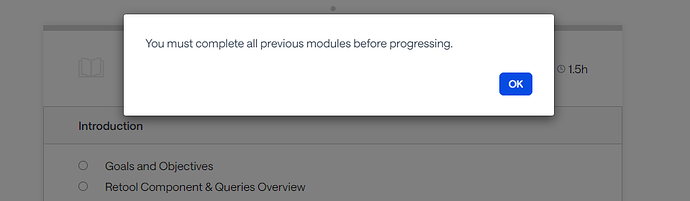
Learning paths in Retool University are structured sequentially — meaning some modules are locked until earlier ones are completed. If you're an experienced developer who doesn't want to sit through introductory content, you have options. Navigate to the Courses tab (separate from the Paths tab) to access individual courses directly, without needing to complete prerequisites. At launch, standalone Fundamentals and Advanced Developer courses were available, with more being added through the following months. This is the fastest way to jump into the content that's actually relevant to your skill level.
Troubleshooting Common Retool University Issues
A few issues cropped up when Retool University first launched. Here's what to do if you run into them:
- Sign-up error on email submission: Make sure your email is fully formatted as
username@domain.com. If the error persists, try submitting again — some users needed two or three attempts before receiving the invite. - Lab asset ZIP files returning 404: Early versions of the Fundamentals course had broken download links for lab assets (e.g.,
fundamentals-api.zip, JS, and SQL files hosted underdocs.retool.com/assets/edu/). These were fixed shortly after being reported. If you're still seeing a 404, try hard-refreshing the page or clearing your browser cache. If the issue persists, flag it in the Retool Community. - Courses appearing locked: Navigate to the Courses tab instead of the Paths tab to access individual modules without needing to follow the sequential path.
Who Should Use Retool University?
Retool University is designed for anyone building, deploying, or managing tools on Retool. The platform specifically calls out four audiences:
- Builders — non-engineers or low-code users assembling internal tools
- Developers — engineers writing custom
JavaScript, connecting APIs, and extending Retool's core functionality - Admins — people managing users, permissions, environments, and organizational settings
- Architects — those designing the broader infrastructure and deployment strategy around Retool
Each role has a tailored learning path, so rather than wading through content that doesn't apply to you, you can follow a curriculum matched to your day-to-day responsibilities.
Build While You Learn
One of the best things about Retool University's structure is that the labs are designed to be done alongside real Retool building. As you work through a module, you're encouraged to open your own Retool environment and apply what you're learning immediately. This active approach to learning is far more effective than passive video watching — and if you hit an "aha" moment, the Retool Community's Show & Tell section is the right place to share what you built.
If you're onboarding a new developer to Retool or trying to upskill your whole team, Retool University's combination of structured paths, individual course access, and progress tracking makes it a practical starting point — far more so than piecing together documentation and YouTube videos on your own.
Ready to build?
We scope, design, and ship your Retool app — fast.