Guides
Retool Timeline Component: Setup, Tips, and Known Bugs
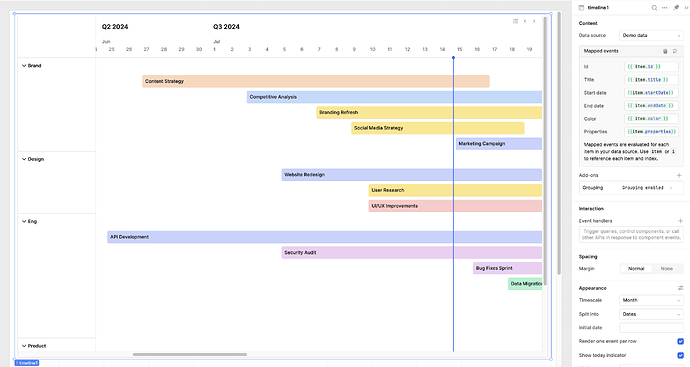
The Retool Timeline component, introduced in Retool version 3.70, gives you a native Gantt-style layout for displaying chronological events — without reaching for a custom component or a third-party library. Built entirely in-house by the Retool team, it's already being used for booking systems, project trackers, and horizontal calendars. This guide covers how to configure it, what's currently broken, and how to work around the rough edges while it's still in beta.
What Is the Retool Timeline Component?
The Retool Timeline component is a horizontal, time-based visualization tool — think Gantt chart — that lets you plot events along a configurable timescale. It was released in beta on Retool 3.70 and above and is distinct from the older component previously called "Timeline," which has been renamed to Event list. The Event list component remains available and displays a simpler, vertical list of chronological events. If you're building anything that needs horizontal time-spanning bars, the new Timeline component is what you want.
How to Set Up the Retool Timeline Component
Getting the Timeline component running is straightforward. Here's what to configure out of the box:
- Timescale unit: In the
Appearancesection, set your timescale toyears,quarters,months, orweeks. Pick the granularity that matches your data — for project planning, months or quarters are typical. - Grouping: Navigate to the
Add-onssection and configure theGroupingoption. Pass the properties you want to group on in thePropertiesinput. This is useful when you have multiple teams, resources, or categories that each need their own swim lane. - Row density: Toggle
Render one event per rowto switch between a densely packed timeline (multiple events share a row) and a layout where each event gets its own row. Dense mode works well for high-volume data; one-per-row is cleaner for presentations. - Custom quarter start: If your fiscal year doesn't start in January, you can set a custom quarter start month and day via the
Advancedsettings inside theAppearancesection of the editor. Note: this cannot be set programmatically — more on that below.
How to Display a Date Range Relative to Today
A common use case is centering the timeline on today's date — for example, showing the last 6 months and the next 6 months. You'd expect something like this to work as your start date:
{{ moment().subtract(6, 'months').format("YYYY-MM-DD") }}
In practice, some users have reported that the timeline ignores this expression and defaults to the beginning of the year (e.g., January 2023) instead. This is a known bug in the beta. If you hit it, export your app as JSON and share it with the Retool team — they've confirmed they're actively investigating this behavior. As a workaround, try hardcoding a specific start date temporarily to confirm your event data is rendering correctly before debugging the dynamic date expression.
Can You Set Timeline Properties Programmatically?
If you've tried something like this in a JavaScript query and wondered why nothing happened:
timeline2.quarterStartMonth = 4;timeline2.quarterStartDay = 1;
That's expected — it won't work. Retool does not currently expose a programmatic API for setting these values on the Timeline component. You can't update quarterStartMonth or quarterStartDay via JavaScript. The only way to configure them right now is through the Appearance → Advanced panel in the editor. The Retool team has acknowledged this gap and it's on their roadmap, along with a scrollToDate() API and better tooltip customization.
What About Hourly or Daily Timescales?
The Timeline component currently supports weeks as its most granular timescale unit. If you're building something like a booking or scheduling system that needs hour-by-hour or day-by-day resolution, the Timeline component isn't the right fit yet. The Retool team recommends using the Calendar component for those use cases while finer timescale support is under development. A user-adjustable timescale is also on the roadmap.
What's Coming Next for the Retool Timeline Component
The component is still in beta, and the Retool team has shared their near-term roadmap:
- Milestone support: Display events that have no start date — just a point in time.
- Better tooltip customization: More control over what appears when hovering over an event.
- Additional APIs: Including
scrollToDate()to programmatically navigate the timeline. - Event list refresh: The older
Event listcomponent will also get improvements in the coming months.
The Bottom Line
The Retool Timeline component is a genuine time-saver if you need Gantt-style visualizations inside an internal tool. It's built natively — no third-party library, no custom component overhead — and the grouping and row-density options cover most real-world layouts. Just go in knowing it's beta software: the dynamic "today" date bug is real, programmatic property setting isn't supported yet, and hourly granularity requires falling back to the Calendar component. Keep an eye on the official community thread and the Retool docs for updates as the component matures.
Ready to build?
We scope, design, and ship your Retool app — fast.