Guides
Retool Text Input Not Filling Container: Fix & CSS Workaround
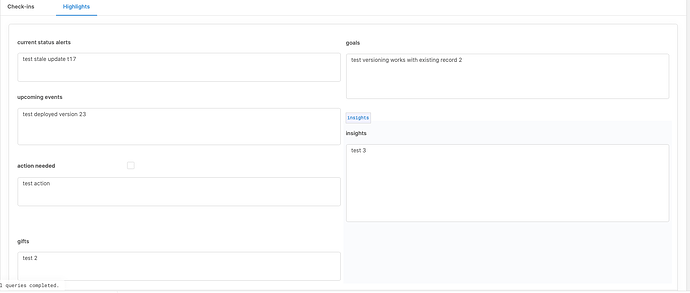
If your Text Input component in Retool is not filling its container — leaving an awkward gap between the input field and the space you allocated in the canvas — you're not alone. This bug surfaced after a Retool update that shipped input validation, and it caused Text Input components to shrink instead of growing to fill their parent container. Here's exactly how to fix it, with or without the official patch in place.
Why Is the Retool Text Input Not Filling Its Container?
The root cause was a regression introduced when Retool shipped input validation support. The change affected the internal flexbox layout of the input-control-component__multiline class, causing the .flex child element to stop expanding to fill the available space. The visual result: your Text Input renders at a fixed, collapsed height rather than stretching to match the container you dragged out on the canvas.
Retool did ship an official fix for this at one point, but several users continued to report the issue persisting on their instances. If you're still seeing it, the CSS workaround below is reliable and takes less than two minutes to apply.
The CSS Fix for Retool Text Input Size
The fix forces the flex child inside the multiline input component to grow and fill the allocated area. The CSS rule you need is:
.input-control-component__multiline .flex { flex-grow: 1; }
You have two ways to apply this, depending on whether you want it scoped to one page or your entire Retool app.
Option 1: Apply the Fix to a Single Retool Page
Use this approach if you only need the fix on one screen and don't want it to bleed into other Retool pages.
- Drag a Text Component onto your Retool canvas (not a Text Input — a plain Text display component).
- In the component's settings panel, turn Render as HTML on.
- Turn Render as Markdown off.
- Paste the following into the component's value field:
<style> .input-control-component__multiline .flex { flex-grow: 1; } </style>
That's it. The component will render invisibly as an injected style block, and every Text Input on that page will immediately grow to fill its container. You can tuck the Text component in a corner or resize it to 1×1 grid units to keep it out of the way.
Option 2: Apply the Fix App-Wide Using Preloaded CSS
If you have multiple Retool pages affected, the cleaner solution is to add the CSS to your app's global preloaded styles so you don't have to repeat the workaround on every page.
- Go to your Retool app's Settings (the gear icon, usually in the top-right or bottom-left of the editor).
- Navigate to the Advanced tab.
- Find the Preloaded CSS field.
- Paste the following (no
<style>tags needed here):
.input-control-component__multiline .flex { flex-grow: 1; }
Save your changes. This will apply the fix across all pages in the app without requiring a Text component on each one.
Does This Fix Work in Safari?
One thing worth flagging: users have reported that the CSS workaround resolves the issue in Chrome but may not fully fix it in Safari. If your internal tool users are on Safari and still seeing the collapsed input size after applying the CSS, this is a known gap. The Preloaded CSS approach is your best bet for the broadest browser coverage, but a full Safari fix may require Retool to address the underlying component behavior in a platform update.
Should You Use a Textarea Component Instead?
Some users have suggested that Retool should offer a dedicated textarea component as an alternative. For multi-line input scenarios, a native textarea handles vertical resizing more predictably than a Text Input set to multiline mode. If your use case involves collecting long-form text — notes, descriptions, comments — and you keep running into sizing headaches, it's worth evaluating whether a textarea-style component better fits your layout needs. As of now, the Text Input component with the CSS fix above remains the standard approach in Retool.
Key Takeaways
- The
Text Inputnot filling its container is a known Retool bug tied to a validation update. - Fix it on a single page by injecting
<style>via a Text Component with HTML rendering enabled. - Fix it app-wide by adding
.input-control-component__multiline .flex { flex-grow: 1; }to Preloaded CSS in Advanced Settings. - The fix works in Chrome; Safari may still have issues at the platform level.
- If Retool ships an update that resolves this natively, you can safely remove the custom CSS without side effects.
Still seeing sizing issues after applying the fix? Drop a comment below or reach out to our team — we build and maintain Retool apps professionally and have seen most edge cases this platform can throw at you.
Ready to build?
We scope, design, and ship your Retool app — fast.