Guides
Retool Table Tag Color Not Working: Fixes That Actually Work
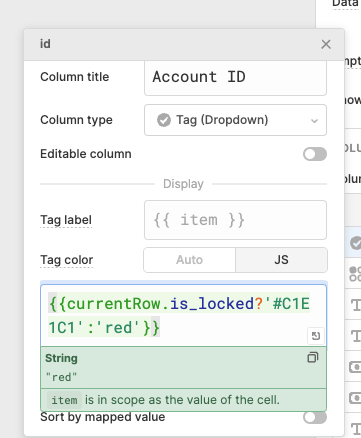
If your Retool table tag color is not working — staying gray regardless of what JavaScript or hex value you enter — you've hit one of the more frustrating bugs in Retool's table component. This issue has affected dozens of developers trying to conditionally color Tag (Dropdown) columns based on row data, like flagging blocked users in red or active ones in green. Here's exactly what's going wrong and how to fix it without waiting for a patch.
Why Retool Tag Colors Break in Tables
The root cause comes down to a few overlapping bugs and edge cases in how Retool evaluates the Tag color field on a column:
- Non-editable columns ignore tag color entirely. If your column's editable toggle is off, the tag color input is effectively ignored — the tags render gray no matter what value or expression you provide.
currentRowdoesn't work in the Tag color field. Retool'scurrentRowcontext variable, which works in many other column fields, is not reliably available in the Tag color expression evaluator.- Toggling editable off resets the color expression. Some users have reported that switching edit mode on and then back off causes the column to default back to
Auto, silently discarding any JavaScript you've written. - Tag color only applies to non-custom values when the Data source input is used — unless
Unique column valuesis selected as the data source.
How to Fix Retool Table Tag Colors (Step by Step)
Depending on your situation, one of the following workarounds will unblock you. Start from the top and work down.
Fix 1: Use the i Variable Instead of currentRow
If you're trying to write a conditional tag color based on row data and currentRow isn't working, switch to the i index variable to reference your table's data directly. For example, if your table is named usersTable and you want to color a tag red when a user is locked:
{{ usersTable.data[i].is_locked ? '#FF6B6B' : '#C1E1C1' }}
This bypasses the currentRow bug entirely by reading straight from the table's underlying data array using the row index i, which is always available in column expression contexts.
Fix 2: Reference the Correct Property on item
If you're using item in your tag color expression, make sure you're drilling into the specific property, not referencing the whole object. Instead of:
{{ item ? '#FF6B6B' : '#C1E1C1' }}
Use:
{{ item.status === 'blocked' ? '#FF6B6B' : '#C1E1C1' }}
Referencing the full item object in a ternary will always evaluate as truthy, so your condition never works as intended.
Fix 3: Make the Column Editable but Set Read Only to True
Since the tag color input works on editable columns but not non-editable ones, a practical workaround is to enable the editable toggle on the column, then set the Read only field to true. This satisfies Retool's internal requirement for the tag color logic to execute, while still preventing users from actually editing the cell. You get the visual styling you want without opening up unwanted edit behavior.
Fix 4: Switch to an HTML Column
If neither of the above works for your use case, replace the Tag column type with an HTML column. This gives you full control over rendering. For example:
{{ '<span style="background:' + (currentRow.is_locked ? '#FF6B6B' : '#C1E1C1') + '; padding: 2px 8px; border-radius: 4px;">' + currentRow.id + '</span>' }}
HTML columns render raw markup, so you can replicate the look of a tag badge with inline styles and full conditional logic. It's more verbose, but it always works.
Fix 5: Use the Background Color Field as a Fallback
For non-editable columns where you only need a color signal (not a tag shape), the Background color input on the column editor modal still works. Use a conditional expression there to highlight the entire cell instead of just the tag:
{{ currentRow.is_locked ? '#FF6B6B' : '#C1E1C1' }}
It's not a perfect substitute for tag styling, but it communicates the same status signal to your users without touching the broken tag color field.
What Retool Says About This Bug
According to Retool staff in the community thread, the tag color issue has been reported to the engineering team and is acknowledged as a bug. The specific behavior — where tag color is broken when the column isn't editable — is a known regression. Until a fix ships, the workarounds above are your best options.
Quick Reference: Tag Color Workarounds
- Replace
currentRowwithtableName.data[i].fieldin the Tag color expression - Always reference a specific property on
item(e.g.item.status), not the object itself - Enable editable on the column, then set Read only to
true - Use an HTML column with inline styles for full rendering control
- Fall back to the Background color field if you just need a visual status indicator
Tag color bugs in Retool tables are annoying precisely because the field accepts your input without any error — it just silently does nothing. If you're still stuck after trying these fixes, check your Retool version and confirm whether your column's Data source is set to Unique column values, as this affects which tag values receive color treatment. When in doubt, the HTML column approach will always give you the output you need.
Ready to build?
We scope, design, and ship your Retool app — fast.