Guides
Retool Table selectRow Not Working with Multiple Selection Mode
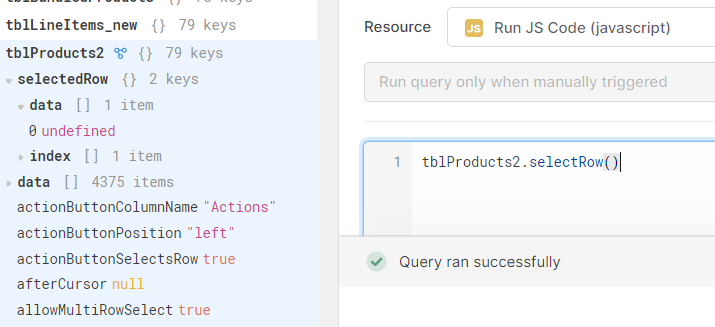
If you've ever fired a JavaScript query and found that table1.selectRow() stopped working after enabling multiple selection mode in Retool, you've hit one of the most commonly reported pain points in the Retool community. The root cause is almost always a syntax mismatch — the method expects different inputs depending on your table's selection mode and which version of the Table component you're using. This guide walks you through every scenario and the exact fix for each.
Why Does table.selectRow() Break in Multiple Selection Mode?
Retool's selectRow() method behaves differently based on whether your table allows single or multiple row selection. When you switch a table from single to multiple selection mode, the underlying API expectation changes — and if your query hasn't been updated to match, it will silently fail or produce unexpected results like a selectedRow value of undefined.
Specifically, two problems surface in multi-select mode:
- Calling
table1.selectRow()with no argument or with a scalar value leaves a single ghost entry inselectedRowwith a value ofundefined. - Trying to clear the selection with
table1.selectRow([])ortable1.selectRow(null)produces the same broken state.
This was confirmed as a bug in Retool and was patched — but the correct syntax rules still trip up developers regularly, especially when migrating from the legacy Table component to the new one.
The Correct selectRow() Syntax for Each Mode
Single-select tables expect a single scalar value (the row index):
table1.selectRow(0);
Multi-select tables expect an array of row indices:
table1.selectRow([0, 1, 2]);
Passing a scalar to a multi-select table, or an array to a single-select table, is the most common cause of the method appearing to do nothing.
How to Build a "Select All Rows" Query in Multiple Selection Mode
A common use case is letting users click a button to select all rows, while still allowing manual multi-row selection by clicking. Here's how to do it correctly:
- Make sure your table has Allow selecting multiple rows enabled in the table's settings panel.
- Create a new JavaScript query (e.g.
selectAllRows) with the following code:
table1.selectRow(_.range(0, table1.displayedData.length));
Note: use table1.displayedData.length (not length - 1) inside _.range(). The _.range() function is exclusive of the end value, so _.range(0, 3) produces [0, 1, 2] — which is exactly what you want.
- Trigger this query from a Button component's event handler set to "Run query".
- To clear all selections programmatically, use:
table1.selectRow([]);
Why selectRow() Works in Legacy Table But Not the New Table
If you've confirmed that selectRow() works in a legacyTable component but fails silently in the new Table component, the issue is an additional layer of syntax introduced in the new component. The new Table component requires row indices to be wrapped in an object with an index key:
table1.selectRow({ index: [0, 1, 2] });
For a select-all implementation on the new Table component, your query should look like this:
table1.selectRow({ index: _.range(0, table1.displayedData.length) });
Skipping the { index: ... } wrapper is the single most frequent reason selectRow() appears broken after upgrading from the legacy table to the new Table component.
Step-by-Step Fix Checklist
- Step 1: Check whether you're using the legacy
Tableor the newTablecomponent. The new component requires the{ index: [] }object syntax. - Step 2: Check your table's selection mode. If Allow selecting multiple rows is enabled, you must always pass an array (or an object wrapping an array for the new table).
- Step 3: Update your JavaScript query to use the correct syntax for your component version and selection mode (see examples above).
- Step 4: If you need to clear the selection programmatically, use
table1.selectRow([])for the legacy table, ortable1.selectRow({ index: [] })for the new table — don't rely on passingnullor calling the method with no arguments. - Step 5: Test by triggering the query manually from the Retool editor's query panel before wiring it to a button, so you can isolate the issue from event-handler timing problems.
When the "Clear Selection" Link Works But Your Query Doesn't
One telltale sign of this bug is that clicking the Clear Selection link rendered inside the table itself properly resets selectedRow, but your custom JS query does not. This confirms the problem is in your query's syntax rather than the table's state or a Retool platform issue. Apply the fixes above and your query will behave the same way the built-in clear link does.
Summary
The table.selectRow() method in Retool is highly sensitive to both the table's selection mode and the component version. Always pass an array to multi-select tables, always wrap it in { index: [] } for the new Table component, and use _.range(0, table1.displayedData.length) for a reliable select-all implementation. With those three rules in mind, this frustrating bug becomes a quick two-minute fix.
Ready to build?
We scope, design, and ship your Retool app — fast.