Guides
How to Reset Filters to Default in Retool's Table Component
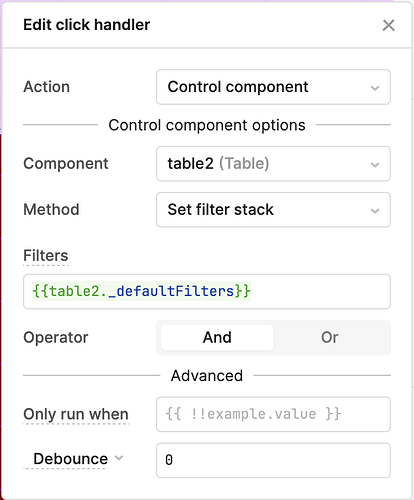
If you've been trying to reset Retool table filters to default and keep hitting dead ends, you're not alone. Retool's new table component has solid filter APIs — you can clear all filters, set a filter stack, or add individual filters — but for a while, there was no native way to revert back to the default filters configured in the component itself. This guide covers every approach, including the native API that now exists, a hidden property workaround, and a known cross-component pitfall to watch out for.
Why "Clear Filters" Isn't the Same as "Reset to Default"
Retool exposes a clearFilters API on the table component, and it's tempting to reach for it when you want a "reset" button. The problem: clearFilters removes all filters, including any defaults you've configured in the component settings. If your table is supposed to show only active records by default, calling clearFilters will wipe that too — leaving users staring at an unfiltered dataset they didn't ask for.
What most developers actually want is to revert to the filters defined in the table's configuration panel, not a blank slate. Those are two very different outcomes.
The Native Solution: resetFilterStack
The cleanest fix is now built into Retool. A resetFilterStack API was added to the table component specifically to revert it back to its configured default filters. If you're on a recent version of Retool Cloud, this is the method you should use.
To wire it up, add a Button component to your app and set its click event handler to run a component method:
- Select the component action type: Control component
- Choose your table (e.g.,
table1) - Select the method:
resetFilterStack
That's it. One click, filters snap back to whatever you defined in the table's filter configuration. No hardcoded values, no drift over time.
The Workaround That Still Works: table1._defaultFilters
Before resetFilterStack existed, the community found a reliable workaround using a hidden internal property. Every Retool table component exposes a _defaultFilters property that holds the exact filter definitions set in the component config. You can use it in a Set filter stack action like this:
- Add a Button and set its click handler to Control component
- Choose your table and select the Set filter stack method
- Set the value to:
{{table1._defaultFilters}}
This approach keeps your reset logic in sync with the component — if you update the default filters in the table config, _defaultFilters reflects that automatically. No hardcoded filter objects to maintain.
One important caveat: properties prefixed with _ in Retool are not official public APIs. They are undocumented, won't appear in autocomplete, and are technically subject to change without notice. Retool's own team has described them as similar to custom CSS — use with caution. That said, _defaultFilters is unlikely to disappear or fundamentally change given how core it is to this pattern.
How to Discover Hidden Table Properties
If you want to explore what other undocumented properties are available on a table component, you can log the entire component object to the browser console. Open your browser's developer tools and run:
console.log(JSON.stringify(table1))
This will print all properties on the component, including hidden ones prefixed with _ such as _defaultFilters and _columnEditable. Treat anything you find here as internal implementation details — useful for building, but not something to depend on in production-critical logic without a fallback plan.
Cross-Component Reset Not Working? Here's Why
A common gotcha: calling resetFilterStack or setting the filter stack on a table that lives in a different view or container than the one currently active may silently fail. Several developers have reported that triggering a filter reset on table3 from a button in a separate view does nothing, but the exact same action works fine when triggered from within the same view as the table.
If you're running into this, check the following:
- Make sure the target table is rendered and visible when the reset action fires — hidden or unrendered components may not respond to control actions
- If you're using tabs or a container with conditional visibility, ensure the table's parent container is active before triggering the reset
- As a workaround, consider storing the current view state and navigating to the correct view before firing the reset action, or use a temporary state variable to signal the table to reset when it becomes active
Which Approach Should You Use?
Here's a quick decision guide:
- On Retool Cloud (recent release): Use
resetFilterStack— it's native, stable, and purpose-built for this. - On self-hosted or older versions without
resetFilterStack: Use{{table1._defaultFilters}}in a Set filter stack action. - Avoid hardcoding filter values in your reset logic — it drifts from your component config and becomes a maintenance headache.
- Avoid
clearFiltersunless you genuinely want a blank filter state, not a return to defaults.
The resetFilterStack API is a great example of Retool responding to real developer pain points. If you're still on a version that doesn't have it, the _defaultFilters workaround is solid enough to ship — just document it so your team knows it's touching an internal property.
Ready to build?
We scope, design, and ship your Retool app — fast.