Tutorials
How to Refresh a Retool Table After a Query Runs
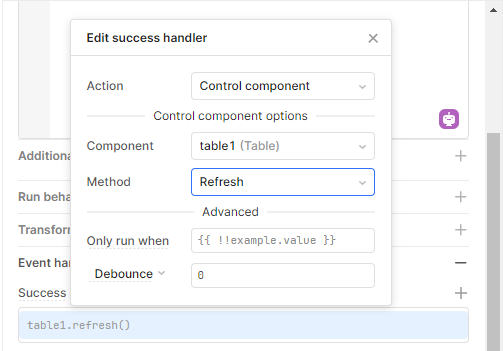
If you've ever clicked an insert button in Retool and then had to manually hit the little refresh icon in the bottom-right corner of your table to see the new row, you've run into one of the most common Retool frustrations. The good news is that Retool table refresh after query is a one-minute fix once you know where to look. This guide walks you through the exact steps, and covers the related errors you're likely to hit when working with editable tables, recordUpdates, and BigQuery or Snowflake connections.
Why Your Retool Table Doesn't Refresh Automatically
Retool queries don't automatically re-run other queries when they finish. When your insert query writes a new row to the database, your read query — the one that populates the table — has no idea that happened. It's sitting there with stale data until something triggers it to run again. The manual refresh button on the table component does trigger that read query, but you obviously don't want your users doing that every time they insert a record.
How to Auto-Refresh a Table After an Insert Query
The fix is to add a Success event handler to your insert (or write) query that runs your read query immediately after a successful insert. Here's exactly how to do it:
- Open your insert query in the query editor (the one that writes the new row to your database).
- Scroll to the bottom of the query panel and find the Event Handlers section.
- Click + Add event handler.
- Set the event to Success.
- Set the action to Trigger query.
- Select your read query — the query that fetches the data displayed in your table (e.g.,
getTableData,readBqQuery, etc.). - Save and test it. Insert a new row and watch the table update without any manual refresh.
That's it. The table's built-in refresh button does exactly the same thing under the hood — it re-runs the query connected to the table. You're just automating that trigger on every successful insert.
Fixing "Unable to Perform Operation Using Terminated Connection"
If you're connecting Retool to BigQuery and you see the error "Unable to perform operation using terminated connection", this means Retool's connection to your BigQuery resource was dropped before the query could execute. A few things to check:
- Go to the Resources panel and test your BigQuery connection to confirm it's live.
- Verify that the service account credentials you're using have the correct IAM scopes (at minimum,
bigquery.dataViewerandbigquery.dataEditorfor read/write operations). - Check whether any required columns in your schema are
NOT NULL— inserting a row without filling those columns will cause the operation to fail and can surface misleading connection errors.
How to Fix "Cannot Read Properties of Undefined (Reading 'ID')"
This error usually shows up when you're trying to build an update query using listrow.recordUpdates[0].ID as a filter, but recordUpdates is empty. Here's what's happening and how to fix it.
The recordUpdates property on a Retool table component only gets populated after a user actually edits a cell in the table. It doesn't come pre-filled from your data source. If no edits have been made, recordUpdates is an empty array — so recordUpdates[0] is undefined, and trying to read .ID off of it throws that error.
To check this yourself, open the State tab in the left panel, find your table component (e.g., listRows), and expand recordUpdates. If it shows [ ] 0 items, no edits have been staged yet.
The fix:
- Make sure your table columns are set to editable in the table component's column settings.
- Double-click a cell in the table to edit a value. This will stage the change and populate
recordUpdates. - Your update query filter should reference
{{table1.recordUpdates[0].ID}}and yourchangeSetshould use{{table1.recordUpdates}}— make sure you're referencing the same table component name in both places.
Fixing the "Unsupported Data Type VARIANT" Error in Snowflake
If you're using Snowflake and see an error like "SQL compilation error: Unsupported data type 'VARIANT'", it means Retool is trying to pass an entire JSON object as the value for a column update, instead of individual field values. This typically happens when the changeSet is misconfigured and the whole row object gets serialized into a single column.
Double-check that your update query is referencing {{table1.recordUpdates}} correctly and that the column mapping in your SQL matches your actual schema column names — not positional indexes like "0". Retool's Bulk Update via Primary Key query mode handles this automatically if you're using a supported resource type.
Quick Summary
- To auto-refresh a Retool table after insert: add a
Successevent handler on your write query that triggers your read query. recordUpdatesis empty until a user edits a cell — this is expected behavior, not a bug.- Terminated connection errors usually point to credential scope issues, not your query logic.
- VARIANT type errors in Snowflake mean your
changeSetis passing a whole object where a scalar value is expected.
Once your event handlers are wired up correctly, your table will stay in sync with your database automatically — no manual refresh required.
Ready to build?
We scope, design, and ship your Retool app — fast.