Guides
Retool Table Grouped Column Headers: What Works Now
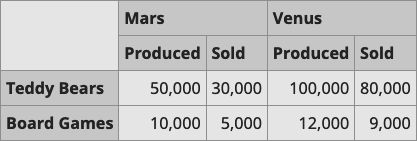
If you're trying to create Retool table grouped column headers — sometimes called stacked columns, two-tier headers, or merged column headers — you've probably already hit the wall: Retool's native Table component doesn't support them out of the box. This is a known limitation that's been requested by the community since at least 2021, and as of now it's still waiting on Retool's product team. Here's exactly where things stand and what you can actually do today.
Why Retool Tables Don't Support Grouped Column Headers
Retool's Table component is built for speed and simplicity — editable cells, sorting, pagination, and row actions work with almost zero configuration. But that simplicity comes at a cost: the table renders a flat, single-row header. There's no built-in way to span a header across two sub-columns the way you can in Ant Design (which Retool uses under the hood) or Material-UI.
The irony is that Ant Design's Table component — the very library Retool's table is based on — natively supports column grouping via its children column config. Retool just doesn't expose that configuration surface to builders. So the underlying capability exists; it's simply not wired up in the Retool UI yet.
The Custom Component Workaround (And Its Tradeoffs)
The most commonly suggested workaround is to build a custom component using raw HTML and JavaScript, then pass your query data into it via the component's model. Here's the general approach:
- Run your query as normal and shape the data in a transformer.
- Pass the transformed data into the custom component's
model. For example, your transformer might return an array of objects like:{ name: "Teddy Bears", produced_mars: 50000, sold_mars: 30000, produced_venus: 100000, sold_venus: 80000 } - Inside the custom component's HTML, write a standard two-tier HTML table using
<thead>withcolspanattributes on the group headers, then iterate overmodel.datato render rows. - Reference your data with
Retool.modelUpdatefor any interactive behavior.
This works well for read-only display tables where you just need to present grouped data cleanly. If your only goal is a nice visual grouping for a report or dashboard, a custom component gets you there in an afternoon.
Why the Workaround Breaks Down Fast
The custom component approach falls apart the moment you need any of Retool's native table features. If your table requires editable columns, you'd have to re-implement cell editing, validation, and change tracking entirely in vanilla JavaScript inside the custom component iframe. Same goes for built-in pagination, row selection, column sorting, and action buttons — all of those are native Table features you lose the instant you switch to a custom component.
For teams using Retool to build internal CRUD tools — which is most of us — losing editable columns is usually a dealbreaker. The custom component workaround is essentially asking you to rebuild a data grid from scratch, which defeats the purpose of using Retool in the first place.
What You Can Do Right Now
Given the constraints, here are the practical paths forward depending on your use case:
- Read-only grouped table: Use a custom component with an HTML table and
colspanheaders. Pass data viamodelfrom a transformer. This is the best option if you don't need editing. - Editable table with visual grouping hint: Keep the native
Tablecomponent but use column naming conventions to imply grouping — for example, naming columnsMars / ProducedandMars / Sold. Not perfect, but readable. - Split into multiple tables: If your data naturally segments, place two separate
Tablecomponents side by side inside aContainer. Each table gets its own clean header. Works surprisingly well for comparison layouts. - Vote on the feature request: The Retool team tracks community demand. The original thread at
community.retool.com/t/stacked-columns-grouped-columns-in-tables/6371is the active request — the more engagement it gets, the higher it climbs in the product queue.
How to Build the Custom Component Table (Step-by-Step)
If the read-only path is right for you, here's the fastest way to get it done:
- Step 1: Add a
Transformerto your app. Write JavaScript to shape your query result into a flat array of objects, one per row, with all grouped fields as top-level keys (e.g.,produced_mars,sold_mars). - Step 2: Add a
Custom Componentto the canvas. In the Model field, setdatato{{ yourTransformer.value }}. - Step 3: In the component's IFrame Code, write your HTML table. Use
<th colspan="2">Mars</th>style headers for the top tier, and sub-headers for the second tier. - Step 4: In the
<script>block, listen forRetool.subscribeto receivemodel.dataand dynamically render<tr>rows usinginnerHTMLorappendChild. - Step 5: Style with inline CSS or a CDN-linked stylesheet. Since the component runs in an iframe, your Retool app's global styles won't bleed in.
The Bottom Line
Retool table grouped column headers are not natively supported today, and there's no confirmed ship date from the Retool team. If you need this feature with full editing support, there's no clean workaround — you're either waiting for Retool to ship it or rebuilding significant table functionality yourself in a custom component. For read-only use cases, the custom component path is viable and well worth the setup time. Keep an eye on the community thread for status updates, and add your voice to the request to help move it up the roadmap.
Ready to build?
We scope, design, and ship your Retool app — fast.