Tutorials
How to Add Tooltips to Retool Table Columns
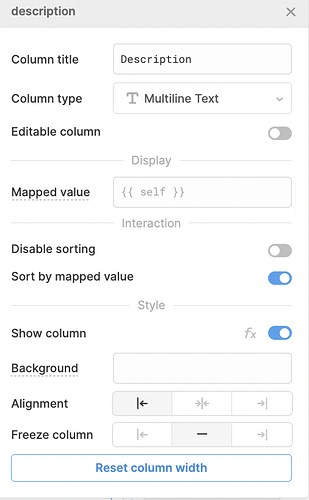
If you've ever wanted to show a retool table column tooltip — a small description that appears when a user hovers over a column header or cell — you're not alone. This is one of the most-requested table UX features in the Retool community, and the good news is that partial support is now built into the new Table component. Here's what's available today, what still isn't, and how to set it all up.
What Kind of Tooltips Does Retool Support?
Retool currently supports header tooltips on columns in the new Table component. This means you can display a tooltip when a user hovers over a column header — useful for explaining what a column contains, what unit a number is in, or any context that doesn't fit in the column label itself.
Cell-level tooltips — where hovering over an individual cell shows content specific to that cell's value — are not yet natively supported as of this writing. This has been submitted as a feature request with the Retool team, so watch the changelog if that's what you need.
How to Add a Tooltip to a Retool Table Column
This only works with the new Table component, not the legacy table. If your app was built a while ago, see the section below on legacy tables. Here's how to add a column header tooltip step by step:
- Select your
Tablecomponent on the canvas to open its configuration panel. - Click on the column you want to add a tooltip to inside the column list.
- Scroll down to the
Add-onssection within that column's settings. - Click the + button next to
Add-ons. - Select
Header tooltipfrom the dropdown. - Enter your tooltip text in the field that appears. This will display when a user hovers over that column's header.
That's it. The tooltip will now appear on hover for that column header across all rows of the table. Repeat the process for any other columns that need tooltips.
Why You Might Not See the Add-ons Option Per Column
A common point of confusion: the Add-ons section appears at both the table level and the column level. If you only see table-level add-ons and not per-column ones, there are two likely causes:
- You're using a legacy table. The legacy (grandfather) table component does not support column-level add-ons. You'll need to rebuild the table from scratch using the new Table component to access this feature.
- You're looking at the wrong panel. Make sure you've clicked into a specific column's settings — not the top-level table settings — before looking for the
Add-onssection.
How to Migrate from a Legacy Retool Table to the New Table
Unfortunately, there is currently no automatic upgrade path from the legacy table to the new Table component. If you're on a legacy table and want to use column tooltips (or any other new Table features), you'll need to recreate the table from scratch. Here's how to approach this with minimal pain:
- Add a new
Tablecomponent to your app from the component panel. - Connect it to the same
datasource as your legacy table (typically a query name like{{ getOrders.data }}). - Reconfigure your columns, column types, and any custom formatting.
- Rewire any event handlers (row click, button click actions, etc.) that were on the old table.
- Once confirmed working, delete the legacy table and position the new one in its place.
It's tedious, but a one-time cost — and the new Table component is meaningfully better in almost every way.
What About Cell-Level Tooltips in Retool?
If what you actually need is a cell-specific tooltip — where hovering over a cell shows content tied to that row's data — that's a separate feature that Retool does not natively support yet. The workaround most teams use today is to add a Text or Tag column type with truncation, relying on the cell expand behavior to surface overflow content. It's not a true tooltip, but it gets close.
If cell-level tooltips are critical to your app, the cleanest current workaround is to build a custom column component using Retool's custom column renderer, injecting a small HTML tooltip via a Custom column type. This requires some JavaScript and CSS but gives you full control over hover behavior.
Summary
Retool's new Table component supports column header tooltips via Add-ons → Header tooltip in the column settings panel. Cell-level tooltips are not yet supported natively and require a workaround. Legacy tables don't support this feature at all — you'll need to rebuild with the new Table component. If you're setting up a net-new table, always use the new Table component so you have access to the full add-ons ecosystem going forward.
Ready to build?
We scope, design, and ship your Retool app — fast.