Guides
Retool Table Button Column Type: Setup & Best Practices
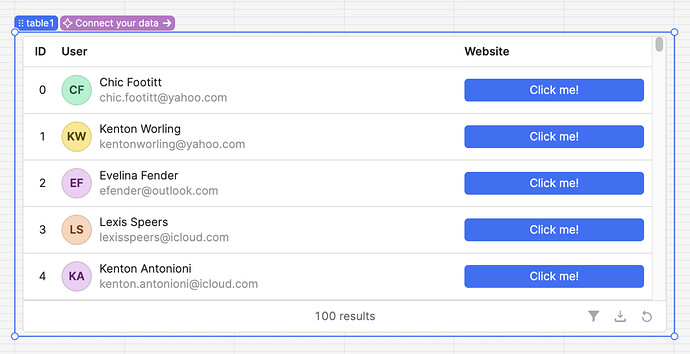
If you've been building internal tools in Retool for any length of time, you've probably hacked together row-level action buttons using hidden columns, custom components, or JavaScript tricks. That era is over. The Retool table button column type is now available on 100% of cloud accounts and ships with self-hosted version 3.28 — giving you a clean, native way to add clickable buttons directly inside table rows.
What Is the Retool Table Button Column Type?
The Button column type is a new formatting option available inside the Table component's column settings. Instead of displaying a cell's raw data, the column renders a clickable button. You can trigger any action — run a query, open a modal, call an API — scoped to the specific row the button lives in. It works exactly the way you'd expect a row-level action button to behave, without any workarounds.
Previously, Retool builders had to get creative: layering components on top of tables, using currentRow hacks in custom columns, or rendering boolean toggles as stand-ins for actions. The native button column type makes all of that unnecessary.
How to Add a Button Column to a Retool Table
Setting this up takes less than two minutes. Here's the step-by-step:
- Select your
Tablecomponent on the canvas and open the Columns panel in the right-hand inspector. - Click the + icon to add a new column, or select an existing column you want to convert.
- In the Format dropdown for that column, select
Button. - Set the button's Label — you can use a static string like
"Approve"or a dynamic expression like{{ currentRow.status === "pending" ? "Review" : "Done" }}. - Under Event Handlers, add a
clickevent and wire it to whichever action you need — trigger a query, run JavaScript, navigate to a URL, etc. - Use
{{ currentRow.id }}or any othercurrentRowproperty inside your query or action to make it row-aware.
That's it. Your table now has a fully functional, row-scoped action button without a single line of workaround code.
How to Use currentRow Data Inside Your Button Action
The most common pattern is passing the selected row's ID or key field into a mutation query. For example, if you have an updateOrderStatus query, you'd reference the row like this in your query parameters:
- Parameter
id:{{ currentRow.id }} - Parameter
status:"approved"
Because the button is scoped to currentRow, each button in the table knows exactly which record it belongs to. No need to track a selected row separately or write logic to figure out which row was clicked.
Can You Add Icons to the Retool Table Button Column?
Not yet — but it's on Retool's radar. Community members have already flagged that the Button column type currently lacks the icon support available on standalone Button components (before icon, after icon). The Retool team has acknowledged the gap and is tracking it. In the meantime, if you need icon-based visual cues, the Boolean column type supports true/false icon configurations, which can serve as a partial workaround for read-only status indicators.
Why This Feature Matters for Internal Tool Builders
Row-level actions are one of the most common patterns in internal tools. Approve a request. Delete a record. Trigger a workflow. Send a notification. Before this feature, every one of those patterns required a workaround — extra components, convoluted state management, or custom JavaScript — just to attach an action to a specific row. The Retool table button column handles this natively, which means less technical debt, faster builds, and fewer bugs caused by brittle workarounds.
It also means your table stays self-contained. The button, its label logic, and its event handler all live in the column config — not scattered across your canvas or app state.
Availability: Cloud and Self-Hosted
The Button column type rolled out to 100% of Retool Cloud users in January 2024. Self-hosted teams get it in version 3.28, which was targeted for release on January 25, 2024. If you're on an older self-hosted version and don't see the option in your Format dropdown, upgrading to 3.28 or later is all you need.
Bottom Line
The Retool table button column type is one of those features that immediately earns its place in every project. If you've been shipping internal tools with row-action workarounds, this is your sign to rip them out and replace them with the native solution. Set it up in your next build, wire it to currentRow, and ship something cleaner than what you had yesterday.
Ready to build?
We scope, design, and ship your Retool app — fast.