Guides
Retool Query Results Wrapped in a "data" Field: What Happened and How to Fix It
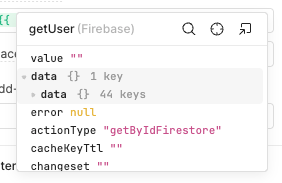
If your Retool app suddenly broke and every query connected to a resource like Firestore or BigQuery is now returning results wrapped in an extra data field, you've hit a known platform-level issue. This "Retool query results wrapped in data field" problem has taken down production apps with zero warning — components that were referencing query.data now need to reference query.data.data, and anything that doesn't get updated breaks immediately.
What Does "Wrapped in a data Field" Actually Mean?
Before the change, a typical Retool resource query — say, a Firestore read — would return results that you'd access directly like this:
{{ myFirestoreQuery.data }}
After the change, the response shape shifts. The actual records are now nested one level deeper:
{{ myFirestoreQuery.data.data }}
This means every table, list, text component, chart, or custom component that was bound to query output using the old path now resolves to undefined or throws an error. If your entire app went blank or stopped displaying data simultaneously, this is almost certainly why.
Which Resources Are Affected?
Based on community reports, the resources most commonly hit by this wrapping behavior include:
- Google Firestore resource queries
- Google BigQuery resource queries
- Potentially other managed resource types that Retool proxies through its backend
REST API queries and JavaScript queries that you write manually are generally not affected by this specific issue, since those return whatever shape your API or logic returns. The problem is specific to Retool-managed resource connectors.
Why Did This Happen?
This is a platform-side regression — a change was pushed to Retool's infrastructure that altered the response envelope for certain resource types. No migration guide was published, no deprecation notice was sent, and no feature flag was exposed to users. Apps that had been running stably for over a year broke within minutes of the change rolling out.
The root cause is that Retool's backend began wrapping the resource response in a standardized { data: ... } envelope — a pattern common in API design for extensibility — but applied it without a versioned rollout or backward-compatible transition period. For self-hosted Retool instances, the timing of impact depends on when your instance pulls the updated release.
How to Fix It: Updating Your Query References
There are a few approaches depending on how many components are affected in your app.
Option 1: Use a JavaScript transformer to unwrap the data
The fastest and most scalable fix is to add a Transformer to each broken query. In the query editor, enable the transformer and add:
return data.data;
This re-exposes the inner array or object at the top level, so all your existing component bindings like {{ myQuery.data }} continue to work without any changes. This is the recommended approach if you have many components bound to a single query.
Option 2: Update component bindings directly
If only a handful of components are affected, you can update each binding manually. Replace references like:
{{ myFirestoreQuery.data }}
with:
{{ myFirestoreQuery.data.data }}
This works but doesn't scale — if you have 30 components bound to 5 queries, that's up to 150 individual edits.
Option 3: Use a global JS query to reshape and cache the result
Create a new JS Query (e.g., normalizedFirestoreData) that runs after your resource query completes and returns the unwrapped result:
return myFirestoreQuery.data.data;
Then re-bind all your components to {{ normalizedFirestoreData.data }}. This centralizes the fix and makes future changes easier to manage.
How to Check If Your App Is Affected
- Open the Retool debugger and run any resource-connected query manually
- Inspect the query's
.dataproperty in the state panel on the left sidebar - If you see
{ data: [ ... ] }instead of a plain array, your app is affected - Check the browser console for
undefinederrors on component render — these will point to the broken bindings
Preventing This Kind of Breakage in the Future
Retool's cloud platform can push changes that affect your app's behavior without notice. Here are a few practices that reduce your blast radius when that happens:
- Use transformers on every resource query — they act as an adapter layer so your component bindings are insulated from upstream shape changes
- Lock to a specific Retool version if you're self-hosted — avoid auto-updating production instances
- Set up a staging environment that mirrors production and gets updates first, giving you a window to catch regressions before they hit users
- Monitor query output shapes using Retool's built-in query logs or an external observability tool
Is This a Retool Bug or Expected Behavior?
As of the time of this writing, this is being treated as an unintentional breaking change — a bug introduced by a platform update. The Retool community thread for this issue saw dozens of affected users report within minutes, confirming this is not a misconfiguration on the user side. If you're still experiencing this after applying the transformer fix, check the original community thread for the latest status updates from the Retool team.
The bottom line: add a transformer that returns data.data to your affected queries, verify your component bindings resolve correctly, and document the change so your team knows why the extra unwrap exists.
Ready to build?
We scope, design, and ship your Retool app — fast.