Tutorials
How to Use Retool Query Parameters with Multiple Buttons
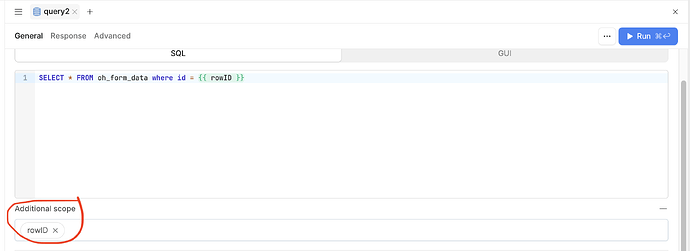
If you have multiple buttons that should trigger the same Retool query with different parameters, you're not alone — this is one of the most common patterns builders run into when working with Retool query parameters across shared queries. The good news is there's a clean, repeatable solution using a JavaScript query as a router, and it works whether you're running SQL, REST API, or any other query type.
Why You Can't Just Pass Parameters Directly from a Button
Retool buttons have an "on click" event handler that lets you trigger a query — but there's no built-in UI for passing dynamic parameters at the moment of the click. If you have five buttons that all need to call the same underlying SQL query with different values (say, different status codes, user IDs, or action types), you'll quickly realize you either have to duplicate the query five times or find a smarter approach. Duplicating queries is a maintenance nightmare. Here's how to avoid it.
Solution 1: Use a JavaScript Query with triggeredById
The cleanest approach is to create a single JavaScript query that acts as a dispatcher. When any of your buttons click it, the JS query reads triggeredById to figure out which button was pressed, then calls the appropriate query with the right parameters.
Here's how to set it up step by step:
- Step 1: Create a new query, set the type to JavaScript, and name it something like
buttonRouter. - Step 2: In the JS query body, use
context.triggeredByIdto identify the calling component. This returns the name of the component that triggered the query — for example,"button1"or"approveButton". - Step 3: Write a conditional block that calls your SQL query with different parameters depending on which button fired. Here's an example:
const buttonId = context.triggeredById;
if (buttonId === 'approveButton') {
return updateStatusQuery.trigger({ additionalScope: { status: 'approved' } });
} else if (buttonId === 'rejectButton') {
return updateStatusQuery.trigger({ additionalScope: { status: 'rejected' } });
}
- Step 4: In your SQL query (e.g.,
updateStatusQuery), reference the scoped variable like this:{{ status }}— it will be populated by whatever value you passed throughadditionalScope. - Step 5: Set every button's on-click event to trigger
buttonRouter. That's it — one query, one JS dispatcher, all buttons covered.
Solution 2: Use a Temporary State Variable
If you prefer to stay closer to Retool's native UI without writing JavaScript, you can use a temporary state variable as a go-between. Here's how:
- Create a temporary state variable — name it something like
selectedAction. - For each button, add an on-click event that sets
selectedActionto the relevant value (e.g.,"approved","rejected", etc.) using the Set temporary state action. - Add a second on-click event on each button to trigger your query.
- In your query, reference the temporary state:
{{ selectedAction.value }}.
This approach works well for simple cases and keeps things visual. The downside is that you're relying on two sequential event handlers firing in order — generally fine, but the JavaScript router method is more explicit and easier to debug.
Which Approach Should You Use?
Use the JavaScript router with triggeredById when you have complex logic, multiple parameters, or want a single source of truth for what each button does. It's more maintainable and easier to extend — if you add a sixth button, you just add another branch to the JS query.
Use the temporary state approach when the logic is simple, you only have one parameter to pass, and you want to avoid writing JavaScript entirely.
How to Reference Parameters Inside a SQL Query
Whichever method you choose, your SQL query needs to reference the dynamic value correctly. If you're using additionalScope, the variable name you define there is available directly in the query editor using double curly braces. For example, if you passed { status: 'approved' }, your SQL would look like:
UPDATE orders SET status = {{ status }} WHERE id = {{ table1.selectedRow.data.id }};
Retool will substitute {{ status }} at runtime with the value from additionalScope. This keeps your SQL clean and parameterized — no string concatenation, no injection risk.
The Bottom Line
Passing Retool query parameters from multiple buttons to a single shared query is a pattern you'll use constantly when building internal tools. Rather than duplicating queries or hardcoding values, a JavaScript dispatcher using context.triggeredById and additionalScope gives you a scalable, readable solution. Set it up once, and adding more buttons later takes seconds.
Ready to build?
We scope, design, and ship your Retool app — fast.