Guides
Retool Query Notification Settings: New Toast UI Guide
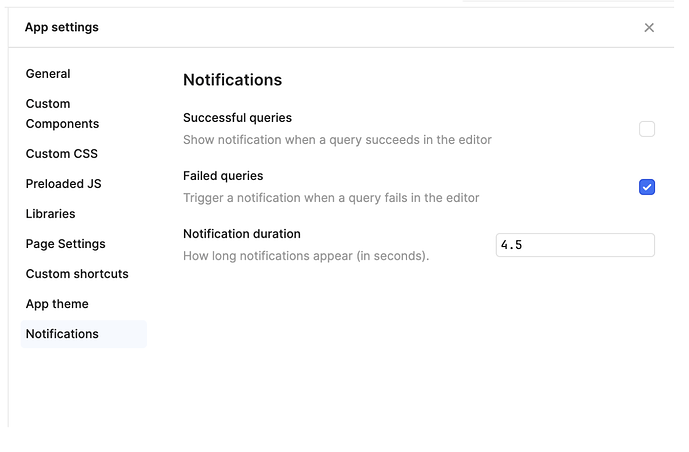
If you've been hunting for a way to control Retool query notification settings without touching every query individually, the wait is over. Retool recently shipped a notification refresh that introduces global query notification controls and a completely redesigned toast UI. Whether you're building internal tools for a handful of ops users or a company-wide dashboard, this update directly changes how your app communicates feedback to end users.
What Changed in Retool's Notification System?
The update ships two distinct improvements that work together: a global notification toggle and a new toast component design. Previously, if you wanted to suppress success or failure notifications, you had to configure each query individually — a time sink when your app has dozens of queries. Now, Retool has introduced a centralized control panel for notifications at the app level.
- Global query notification settings: A single place to enable or disable success and failure notifications for all queries in your app, including any new queries added in the future.
- Updated toast UI: The new toast design includes close buttons, action buttons, and description fields. Toasts now stack cleanly instead of overlapping or pushing content.
This is a cloud-only rollout for now, and it's being gradually enabled across organizations. If your org hasn't received it yet, you can request early access through Retool's community forum.
How to Configure Global Query Notification Settings in Retool
Once the feature is enabled for your org, here's how to access and configure the global notification settings:
- Open your Retool app in the editor.
- Navigate to the
App settingspanel (typically accessible from the left sidebar or the top toolbar). - Look for the Notifications section within app settings.
- Toggle
Success notificationsandFailure notificationson or off globally. This setting applies to all existing queries and any newqueryyou add going forward. - Save your changes — no redeployment required for cloud apps.
This is especially useful if you're building tools where silent background refreshes are expected behavior. Constant "Query ran successfully" toasts are noise for power users. One toggle kills them all.
What's New in the Retool Toast UI?
The redesigned toast component isn't just cosmetic. Here's what the new UI adds and why it matters for app builders:
- Close buttons: Users can now manually dismiss toasts instead of waiting for the auto-dismiss timer. This reduces frustration in high-activity dashboards where multiple operations fire in quick succession.
- Action buttons: You can now attach a call-to-action directly inside a toast notification. This opens up patterns like "Undo" buttons on delete operations or "View record" shortcuts after a successful insert.
- Description fields: Beyond a short title, toasts now support a longer description string — useful for surfacing error messages from your API or database without routing users to a separate error log.
- Stacking behavior: Multiple toasts now stack in a structured queue rather than piling on top of each other, keeping the UI readable even during bulk operations.
Why This Matters for Internal Tool Builders
Notification fatigue is real. When every query fires a success toast, users start ignoring all notifications — including the failure ones that actually matter. The ability to configure Retool query notification settings globally means you can adopt a quieter-by-default approach: suppress success noise, keep failure alerts prominent, and use action buttons to make those alerts actionable.
For teams using Retool as a customer support tool, an ops dashboard, or a data entry interface, these changes reduce the overhead of polishing the notification experience. Instead of writing custom showNotification logic in every query's success/failure handlers, you set the baseline once and override only where you need to.
Not All Toasts Have Migrated Yet — Here's What to Expect
Retool has been transparent that the migration is gradual. Not every internal toast has been swapped to the new UI component yet. Over the coming weeks, more system-generated notifications — like those from resource connection errors or permission failures — will be updated to match the new design. If you see a mix of old and new toast styles in your app, that's expected and temporary.
To stay ahead of the rollout, keep an eye on Retool's changelog and community announcements. If you're a cloud customer and want to enable the feature for your org before the full rollout, reach out via the Retool community thread and provide your org subdomain.
How to Request Early Access
If your organization is on Retool Cloud and hasn't received the update yet, the process is straightforward:
- Go to the Retool community thread for this feature.
- Comment with your org's subdomain (e.g.,
yourcompany.retool.com). - A Retool team member will manually enable the feature for your org, typically within a business day.
The notification refresh is a small but high-impact quality-of-life improvement. Global Retool query notification settings, a stacking toast UI with action buttons, and cleaner dismiss behavior all add up to a more professional experience for your end users — without requiring any extra query-level configuration on your part.
Ready to build?
We scope, design, and ship your Retool app — fast.