Guides
Retool Public Links on the Free Plan: How to Share Apps
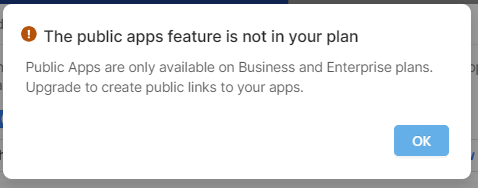
Retool public links are now available on every Cloud plan — including the Free tier. That means you can share a Retool app with anyone using a simple URL, no Retool account required on their end. Whether you're shipping a side project, sending a demo to a client, or building a small utility for a group of friends, this change removes the biggest barrier to sharing your work publicly.
What Are Retool Public Links?
A public link lets you expose a Retool app to unauthenticated users — anyone with the URL can open and interact with it. Before this update, public access was gated behind paid plans. Now it's available on Free, Team, Business, and Enterprise Cloud plans. If you've built something that doesn't touch sensitive data and doesn't need user-level authentication, you can simply enable public access and hand out the link.
This is ideal for:
- Internal demos you want to share with stakeholders who don't have Retool accounts
- Side projects or hobby tools you want friends to try
- Simple utilities — calculators, lookup tables, form submissions — that need zero login friction
- Portfolio pieces or proof-of-concept apps for prospective clients
How to Enable a Public Link in Retool
Enabling a public link takes under a minute. Here's how to do it:
- Open your app in the
Retooleditor. - Click the Share button in the top-right corner of the toolbar.
- Toggle on Public access in the sharing panel.
- Copy the generated public URL and share it with anyone.
That's it. The recipient doesn't need a Retool account. They just open the link and your app loads. You can disable public access at any time by toggling it back off in the same panel.
Does This Work on Self-Hosted Retool?
No — and this is a common point of confusion. Public links are a Retool Cloud-only feature. If you're running a self-hosted deployment (even on a recent version like 3.276), you'll see an error message when you try to enable public access. This feature is not available for self-hosted instances. Enterprise customers with a specific self-hosted use case can reach out to their account representative to discuss options, but there's no general self-hosted support for public links right now.
Do Public Links Work on Mobile Apps?
Yes. Public links are supported for Retool mobile apps as well, not just web apps. So if you've built a mobile interface and want to share it publicly, the same toggle applies.
Authentication Limits: What You Can and Can't Do
This is the part most builders run into. Because public apps are accessed anonymously, there are real constraints on how you can use authenticated resources.
What works: You can connect public apps to resources (databases, APIs) that use static credentials — a single API key, a read-only database user, a fixed service account. The resource authenticates, but it does so the same way for every visitor.
What doesn't work: Any authentication scheme that references current_user or tries to distinguish between individual end users is not supported in public apps. Since all interaction is anonymous by definition, Retool has no concept of "who is visiting" to pass through to your backend.
A common workaround for lightweight user differentiation: pass a dynamic parameter via the URL (e.g., a token or ID in the query string), then read that value in your app using url.searchParams and pass it into your queries manually. This isn't true authentication, but it can work for simple use cases where you control who receives the link. Treat any such parameter as untrusted — don't use it to gate access to genuinely sensitive data.
Key Limitations to Know Before You Build
- Cloud only: Self-hosted deployments are not supported.
- No per-user auth: You can't use
current_useror session-based authentication in public apps. - Anonymous by design: Every visitor is treated identically — plan your data access and permissions accordingly.
- Static resource credentials only: Any resource your public app queries must authenticate with fixed, non-interactive credentials.
When Should You Use Retool Public Links?
Use public links when your app is genuinely low-risk — read-only dashboards, simple form tools, demos with mock data, or utilities with no sensitive backend. If your app touches private user data, financial records, or anything that should be access-controlled, public links are the wrong tool. Use Retool's built-in permission groups and SSO integrations instead to keep access scoped to the right people.
But for the right use case, Retool public links on the Free plan are a genuinely useful unlock. Build something, grab the link, and share it — no plan upgrade required.
Ready to build?
We scope, design, and ship your Retool app — fast.