Guides
Retool Permissions Getting Wiped: Causes and Fixes
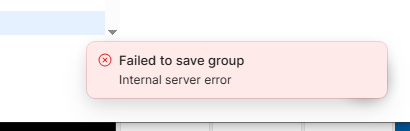
If you've opened your Retool instance and found that Retool permissions are getting wiped — groups showing zero apps and resources, internal server errors on save, or roles disappearing entirely — this guide is for you. This issue surfaced prominently in Retool Cloud and affected multiple teams running version 3.368.x and earlier. Below, we break down exactly what triggers the wipe, what the error messages mean, and the fastest path to recovery.
What Does a Retool Permissions Wipe Actually Look Like?
When this bug hits, you'll typically see a combination of the following symptoms:
- "Internal server error" when trying to save resource access on a group
- "X must be unique" error appearing on certain resource saves
- All apps and resources on every group dropping to
0 - Duplicate
legacy_user_settingsrole entries appearing in your Roles & Permissions list (e.g.,legacy_user_settings : 39845713984719) - Saving permissions for one group silently removing roles or resources from another group
- Resources from other Retool instances briefly appearing in your resource list
The two error types — internal and unique — are not random. Specific resources tend to trigger one type consistently. For example, Retool Email at the top-level permission scope reliably throws the internal error, while selecting the production environment only may throw the unique error instead.
Why Do Retool Permissions Get Wiped?
Based on reports from affected teams, the most reliable trigger sequence is:
- Creating a new
Roleand assigning it to one or more groups - Noticing a legacy duplicate role in the Roles list
- Removing all groups from the legacy role and then deleting the legacy role
- Returning to the Groups list to find all apps and resources reset to zero
Deleting a role — especially a legacy one — appears to cascade destructively through group-resource associations. When a role is deleted, it can strip resources from every group that role was ever connected to, even indirectly. Retool's engineering team traced the root cause to a feature flag introduced in a recent cloud release, which was subsequently rolled back in version 3.369.0 and fully resolved shortly after.
Step-by-Step: How to Recover Retool Group Permissions
If you're in the middle of a permissions wipe right now, work through these steps in order. Do not attempt to delete any roles until the issue is resolved.
- Step 1 — Check your Retool Cloud version. Navigate to your instance settings and confirm you're on version
3.369.0or later. If not, contact Retool support to trigger the update or feature flag rollback. - Step 2 — Use "Use All" as a temporary unlock. For resources that refuse to save with granular permissions, setting
Use Allon the resource will bypass the unique/internal errors and restore access. This is not a permanent fix — treat it as a stopgap while you rebuild. - Step 3 — Recreate affected groups from scratch. Rather than trying to repair broken groups, create new groups and rebuild their permissions fresh. When creating each new group, assign the two auto-generated
Legacyroles that Retool creates automatically, plus any relevantCustomrole. - Step 4 — Save one resource at a time. Even after the patch, saving multiple resource permission changes simultaneously can still trigger errors in some instances. Save each resource access change individually, return to the main Groups list between each save, then reopen the group for the next change.
- Step 5 — Handle Retool Email and Retool DB at the environment level. If
Retool EmailorRetool DBcontinue to throw errors at the top-level resource scope, open the resource permission row, switch the scope toproductionenvironment only, and save from there. - Step 6 — Avoid deleting roles until verified stable. The original wipe is consistently triggered by deleting a role that groups depend on. Until your instance is confirmed stable on a patched version, treat role deletion as a high-risk operation and defer it.
The Group-Overwriting Bug: Roles and Resources Alternating Between Groups
Even after the initial fix in 3.369.0, some users encountered a secondary bug: editing Group A (adding a role and a resource, then saving) would silently remove the role or resource from Group B that had been saved earlier. Then fixing Group B would break Group A again — an alternating overwrite loop.
The only reliable workaround for this secondary issue was the same single-save approach: add one role or one resource per save, return to the main Groups list, then continue. Retool's team addressed this with a full rollback of the underlying feature flag, resolving both the original wipe behavior and the alternating overwrite.
How to Prevent Retool Permission Wipes in the Future
- Before deleting any
Role, audit every group it is assigned to and manually remove the association first — do not rely on Retool to clean up cascading dependencies automatically. - When updating resource access for multiple groups, make changes one group at a time rather than in bulk.
- Document your group-role-resource matrix in an external spreadsheet so you have a recovery reference if a wipe occurs.
- Monitor the Retool community and your instance release notes when upgrading — permission-related regressions have appeared more than once across minor releases.
- After any Retool Cloud update, do a quick spot-check on two or three groups to confirm resource counts are intact before users start their day.
When to Contact Retool Support
If your instance is on the latest Retool Cloud version and you are still seeing permissions getting wiped, internal server errors on group saves, or resources from other organizations appearing in your resource list, open a ticket immediately. The cross-organization resource leak observed by affected users — where unowned resources appeared briefly in the dependency selector — is a data-isolation concern that warrants direct escalation beyond a community workaround.
The good news: Retool's team responded quickly once the issue was reported, shipping a targeted fix and then a full feature flag rollback within the same support thread. Detailed reproduction steps (version, trigger sequence, error type, affected resource names) will get you to resolution faster.
Ready to build?
We scope, design, and ship your Retool app — fast.