Tutorials
Retool Nested ListView: How to Build One That Works
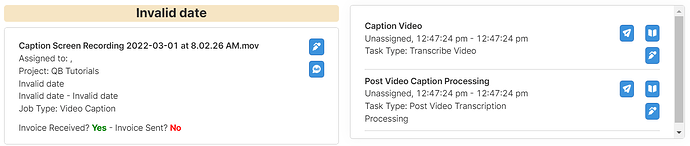
If you've tried to build a Retool nested ListView and hit a wall, you're not alone. This was one of the most upvoted feature requests in the Retool community for years — and while support was eventually added, the documentation leaves a lot of developers scratching their heads at 11pm. This guide breaks down exactly how nested ListViews work in Retool, what the ri and i index variables mean, and gives you working code examples you can drop straight into your app.
Why Retool Nested ListViews Were So Hard to Build
Retool's original ListView component used a single variable, i, to index items inside the list. This worked fine for flat lists, but the moment you needed a list inside a list — say, jobs with nested tasks, or orders with nested line items — you were stuck. A second loop would need its own index variable (think j in traditional programming), and there was no way to provide one.
For a long time, the Retool team acknowledged this as a non-trivial fix that risked breaking existing apps. After significant community pressure, nested ListView support was eventually shipped. The catch: the syntax is unintuitive and the docs are sparse. Here's what you actually need to know.
Understanding the ri and i Index Variables in Nested ListViews
When you nest a ListView inside another ListView in Retool, two special index variables become available inside the inner list:
i— the current index of the inner (child) ListView iterationri— an array that tracks the index of each outer (parent) ListView level
The key insight is that ri[0] gives you the current index of the outermost ListView. So if you have jobs at the top level and tasks nested inside, ri[0] is the job index and i is the task index. This is the part that trips almost everyone up the first time.
Step-by-Step: Building a Retool Nested ListView
Let's say your query is named qryJobsSelect_JSON and it returns an array of job objects, each containing a nested tasks array. Here's how to wire everything up:
- Step 1: Add a ListView component to your canvas. Set its data source to
{{qryJobsSelect_JSON.data}}. - Step 2: Inside the outer ListView, add a Text component to display the job name. Use:
{{qryJobsSelect_JSON.data[i].job_name}} - Step 3: Drag a second ListView component inside the first one. This is your inner (nested) ListView.
- Step 4: Set the inner ListView's data to the nested array:
{{qryJobsSelect_JSON.data[i].tasks}} - Step 5: Inside the inner ListView, add a Text component to display each task name. Use:
{{qryJobsSelect_JSON.data[ri[0]].tasks[i].task_name}}
Notice the critical difference in step 5: inside the nested list, i now refers to the inner loop index (the task), so to reference the parent job you must use ri[0] instead of i.
What Your Data Structure Should Look Like
Nested ListViews work best when your query returns a fully nested JSON structure. Here's a minimal example of what that looks like:
{ "job_id": 69, "job_name": "Caption Screen Recording", "tasks": [ { "task_id": 145, "task_name": "Caption Video" }, { "task_id": 146, "task_name": "Post Video Caption Processing" } ] }
If your data comes back as flat rows from a SQL join, you'll need to transform it first — either in a JavaScript query using reduce to group tasks by job, or by restructuring the response in your backend before it reaches Retool.
Known Performance Issues with Nested ListViews
Retool's nested ListView implementation is functional but comes with a performance cost, especially with large datasets. Each inner ListView re-renders independently, which can cause noticeable lag when you have many parent rows each containing many child rows. A few things that help:
- Limit the number of items rendered at once by paginating the outer ListView
- Avoid putting complex queries or transformations directly inside list item expressions — pre-process data in a dedicated query instead
- Consider whether a Table component with expandable rows or a custom component might serve your use case better if the dataset is large
Going Deeper Than Two Levels
If you need three levels of nesting, ri scales with you. In a third-level ListView, ri[0] is the outermost index, ri[1] is the second level, and i is the innermost. In practice, three levels of nesting tends to create serious performance and readability problems — at that point, a custom React component or a redesigned data model is usually the better path.
Quick Reference: Retool Nested ListView Index Variables
i— current index in the innermost active ListViewri[0]— index of the first (outermost) parent ListViewri[1]— index of the second-level parent ListView (three-level nesting)
Nested ListViews in Retool are now a real, supported feature — they just require understanding that i shifts meaning depending on which ListView scope you're in, and that ri is how you reach back up to parent-level data. Once that clicks, the rest is straightforward.
Ready to build?
We scope, design, and ship your Retool app — fast.