Tutorials
Retool Nested JSON to Table: How to Flatten and Display Your Data
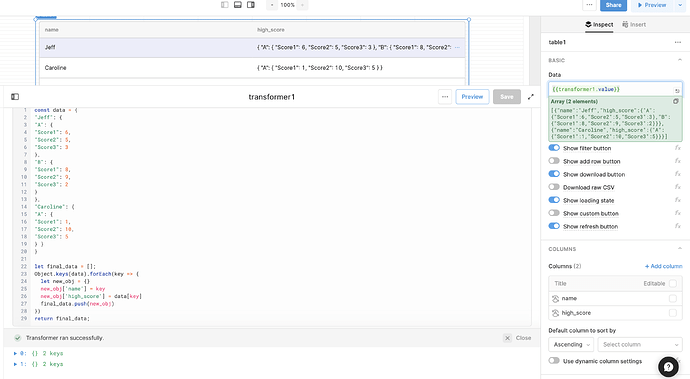
If you've tried connecting a nested JSON API response to a Table component in Retool, you've probably hit the same wall: the table renders your top-level keys as columns, and every row is just a blob of nested objects. That's not a bug — it's just how Retool handles data that isn't already in a flat, tabular shape. The fix is to use a JS Transformer to reshape your nested JSON into a format Retool's table can actually work with, before the data ever reaches the component.
Why Retool Can't Automatically Flatten Nested JSON
Retool's Table component accepts two data shapes: an array of objects (where each object is a row) or an object of arrays (where each key is a column). When your API returns deeply nested JSON — like names mapped to trials mapped to scores — neither shape is satisfied out of the box. Retool doesn't know which level of nesting should become a row versus a column, so it dumps the raw structure in as-is. You need to tell it explicitly by transforming the data yourself.
What Your Nested JSON Looks Like
Here's a typical example of the kind of nested JSON structure that causes this problem:
{ "Jeff": { "A": { "Score1": 6, "Score2": 5, "Score3": 3 }, "B": { "Score1": 8, "Score2": 9, "Score3": 2 } }, "Caroline": { "A": { "Score1": 1, "Score2": 10, "Score3": 5 } } }
You've got three levels deep: a person's name, a trial label (A, B, C), and individual scores. The goal is to flatten this into rows — one per person — with meaningful column values like their highest score across all trials.
How to Use a JS Transformer to Flatten the Data
In Retool, create a new query and set its type to Run JS Code (also called a JS Transformer or JavaScript Query depending on your version). This lets you write JavaScript that reads from your API query and returns a reshaped array that the Table component can consume directly.
Here's the step-by-step:
- Create a new query, set the type to Run JS Code.
- Reference your API query's data using
{{your_api_query.data}}. - Use
Object.keys()to iterate over the top-level names. - For each name, build a flat object with the columns you want.
- Push each flat object into a results array and return it.
- Set your
Tablecomponent's data source to{{your_transformer_query.data}}.
The JS Transformer Code: Basic Flattening
This version creates one row per person and calculates the highest score across all their trials and all score fields:
const data = {{your_api_query.data}};
let final_data = [];
Object.keys(data).forEach(key => {
let new_obj = {};
new_obj['name'] = key;
let all_scores = [];
Object.keys(data[key]).forEach(trial => {
Object.values(data[key][trial]).forEach(score => {
all_scores.push(score);
});
});
new_obj['high_score'] = Math.max(...all_scores);
final_data.push(new_obj);
});
return final_data;
This returns an array like [{ name: "Jeff", high_score: 9 }, { name: "Caroline", high_score: 10 }] — exactly the shape Retool's Table needs.
How to Split Trials Into Separate Columns
If you want each trial (A, B, C) to appear as its own column rather than collapsing everything into a single high score, just add more key-value pairs to new_obj inside the transformer:
new_obj['name'] = key;
new_obj['high_score_A'] = data[key]['A'] ? Math.max(...Object.values(data[key]['A'])) : null;
new_obj['high_score_B'] = data[key]['B'] ? Math.max(...Object.values(data[key]['B'])) : null;
The null-check (data[key]['A'] ?) is important here — not every person in your dataset will have every trial, as the original example shows with Caroline only having trial A. Without the guard, you'll get a runtime error when trying to call Object.values() on undefined.
Troubleshooting: Transformer Returns No Data
If your transformer isn't returning data, check these things first:
- Click Preview on the transformer query — if the preview is empty, the upstream API query may not have run yet or is returning an error.
- Make sure your API query has actually been triggered and has data in
.data. Open it and check the Response tab. - Check that the reference in your transformer matches the exact name of your API query —
{{your_api_query.data}}should match the query's actual name in Retool. - If the input field shows a red outline or error badge, click into it — Retool will often surface a specific JavaScript error message that points you to the problem line.
- Add a
console.log(data)before your loop to inspect what the transformer is actually receiving in the browser console.
Connecting the Transformer to Your Table
Once your JS Transformer query is returning the correct flat array, wire it to your table by setting the Table component's Data property to {{your_transformer_query.data}}. Retool will automatically generate columns based on the keys in your returned objects. You can then rename, reorder, or hide columns directly in the table's column settings panel without touching the code again.
Flattening nested JSON with a JS Transformer is one of the most common patterns in Retool development. Once you've done it once, you'll reach for it constantly — it works for API responses, Firestore documents, or any deeply structured data source that doesn't map cleanly to rows and columns out of the box.
Ready to build?
We scope, design, and ship your Retool app — fast.