Guides
Retool Multipage App Features: Complete Update Guide
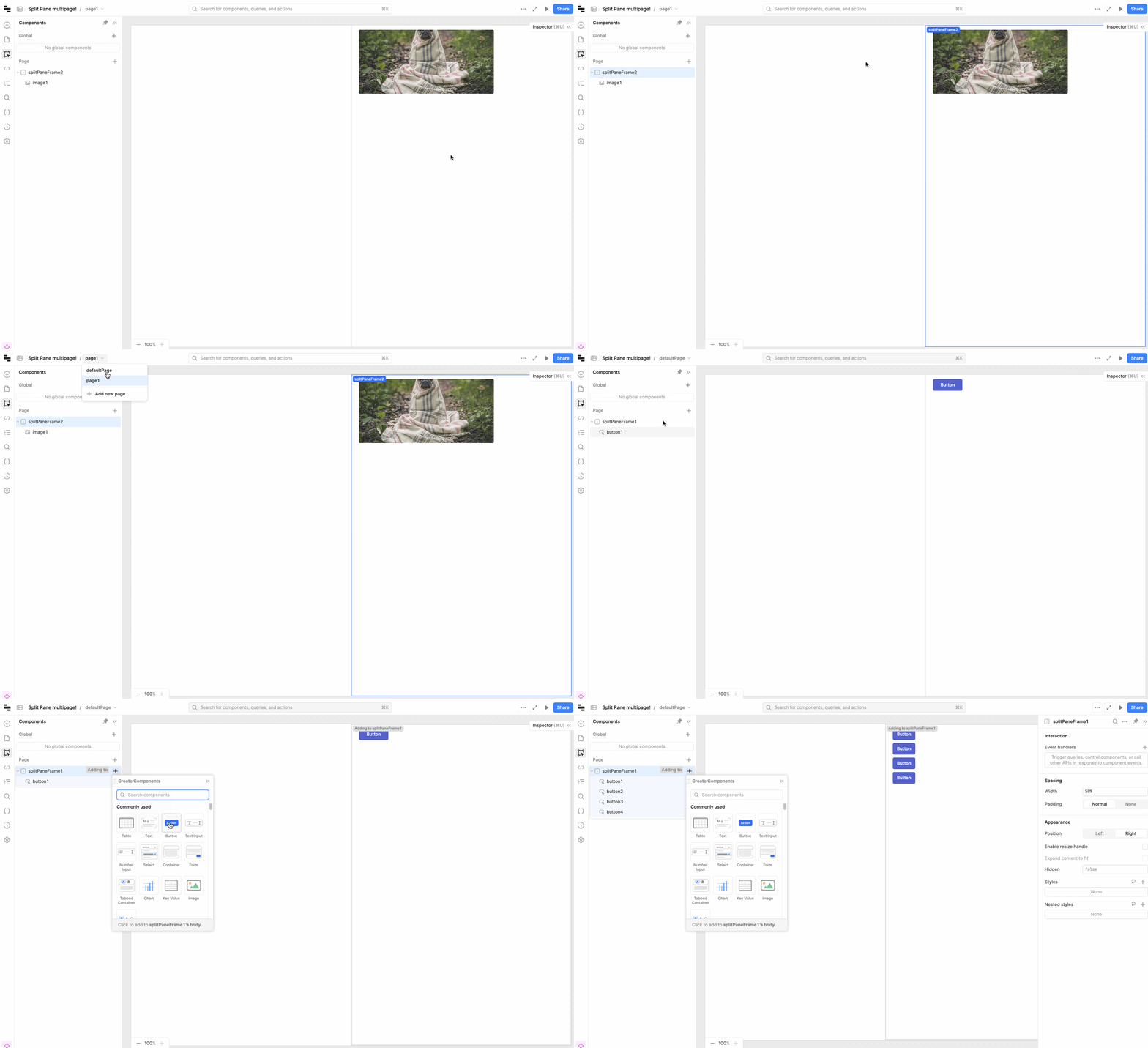
If you're building a Retool multipage app and wondering what's actually available today — split panes, global frames, dynamic navigation, page-level headers — this guide covers every major feature that has shipped, what version it landed in, and how to wire it up. No release note hunting required.
What Is Retool Multipage and How Do You Enable It?
Retool's multipage feature lets you build a single Retool app with multiple pages, shared global UI elements, and proper navigation — instead of stitching together separate apps. If you're on cloud, you can enable multipage directly from your admin settings without filling out a beta form. On-prem users still need to request access via the beta form from Retool's team.
Split Pane Support (Cloud 3.79.0)
Split pane layout is supported in multipage apps as of cloud 3.79.0. You can add one split pane per page and it lives in page scope — meaning it's isolated to that page rather than shared globally. This was also released on the 3.79.0 edge on-prem release.
Public and Embedded Multipage Apps (Cloud 3.79.0)
Public and embedded multipage apps shipped alongside split pane in cloud 3.79.0. If you need to expose a multipage app to external users or embed it in another product, you can follow Retool's standard embed documentation — the multipage structure is fully preserved in both public and embedded contexts.
Global Frames: Modals, Drawers, and Split Panes (Cloud 3.90.0)
As of cloud 3.90.0, you can add global modals, drawers, and split panes to multipage apps. These live at the app level rather than a single page, so you define them once and they're accessible from any page. This is especially useful for things like a global confirmation modal or a persistent side drawer for filters.
Also released in 3.90.0: the ability to duplicate pages inside a multipage app — a small but frequently requested quality-of-life improvement.
Page Context Globals: retoolContext.currentPage and retoolContext.pages (Cloud 3.102)
This is one of the most useful multipage additions. Cloud 3.102 introduced two new globals you can reference anywhere in your app:
retoolContext.currentPage— stores theidof the page the user is currently on. Use this to conditionally show or hide components in a global header depending on which page is active.retoolContext.pages— an array of page objects, each containing:id(string),title(string or null),url(string), andisCurrentPage(boolean).
How to Wire Up Dynamic Navigation Using retoolContext.pages
Instead of manually configuring each nav item, you can now bind your navigation component directly to your multipage structure. Here's how:
- Set the navigation component's Mode to
Mapped. - Set the Data source to
fxmode and enter{{ retoolContext.pages }}. - Configure the mapped menu item fields (label, icon, etc.) as needed.
- Add an event handler on item click and use
utils.openPage(item.id)to navigate to the correct page dynamically.
This means adding a new page to your app automatically adds it to the nav — no manual wiring needed.
Dynamic Page Navigation in Go to Page (Cloud 3.107)
Prior to cloud 3.107, the Go to page action was limited to a static dropdown. Now you can pass a dynamic value — for example {{ item.id }} — directly into the page field. This landed in cloud 3.107 and on-prem 3.108-edge. Combined with retoolContext.pages, your navigation components can now be fully data-driven with minimal configuration.
Page-Specific Headers and Sidebars (Cloud 3.111)
Cloud 3.111 shipped page headers and sidebars — a long-awaited feature for teams that need different layouts on different pages. Here's how they work:
- You can add a page-specific header or sidebar through the Add UI or Logic tab or the Component Tree tab.
- If both a global header/sidebar and a page-specific one exist, the page-specific version overrides the global one for that page only.
- All other pages continue using the global header/sidebar unless they have their own override.
This makes it straightforward to have a standard global nav across most pages while giving specific pages — like a fullscreen dashboard or a settings screen — their own layout treatment.
Multiplayer Editing in Multipage Apps
Multiplayer editing (collaborative real-time editing) for multipage apps entered beta on cloud. If your team needs multiple developers working in the same multipage app simultaneously, you can request access via Retool's beta form.
Summary: What's Available in Retool Multipage Today
- 3.79.0: Split pane support, public and embedded multipage apps
- 3.90.0: Global modals, drawers, and split panes; duplicate page
- 3.102:
retoolContext.currentPageandretoolContext.pagesglobals - 3.107: Dynamic
Go to pagenavigation - 3.111: Page-specific headers and sidebars with global override logic
- Beta: Multiplayer editing in multipage apps
If you're building a complex internal tool on Retool, multipage is now mature enough to support real production apps — global layout, dynamic nav, page context awareness, and per-page overrides are all there. Start with retoolContext.pages to drive your navigation and layer in page-specific headers where you need layout flexibility.
Ready to build?
We scope, design, and ship your Retool app — fast.