Guides
Retool Mobile Editor Performance Improvements Explained
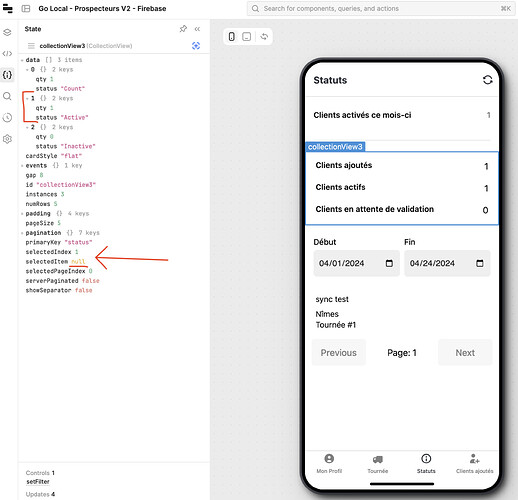
If you've been building mobile apps in Retool and noticed the editor loading faster or behaving more predictably, that's not a coincidence. Retool recently rolled out a significant overhaul to its Retool mobile editor, focusing on performance improvements and the elimination of a whole class of bugs that made the build experience frustrating. This guide breaks down what changed, what bugs still exist, and what to do if something breaks while you're mid-deadline.
What Changed in the Revamped Retool Mobile Editor
The update — described by the Retool team as "a much faster version of the mobile editor" — ships with a long list of under-the-hood changes rather than surface-level UI tweaks. Here's what was targeted:
- Faster editor load times: The new architecture reduces the time it takes to open the mobile editor, especially for larger, more complex apps.
- Elimination of model divergence bugs: This was the big one. Previously, the app state inside the IDE could silently fall out of sync with the app preview — components would appear selected or updated in one view but not the other. The Retool team calls these
model divergence bugs, and they've been a core source of confusing, hard-to-reproduce issues. - Improved editor stability: Fewer random crashes, fewer moments where the editor just feels broken without an obvious error message.
You can confirm you're on the new editor by checking the icon in the bottom bar of the mobile editor interface. If you're on Retool Cloud, the update has been enabled for 100% of cloud users.
How to Enable the New Retool Mobile Editor (Cloud Users)
If you're on Retool Cloud and don't see the new editor yet, here's what to check:
- The rollout was gradual, starting with a subset of cloud organizations. It is now at 100% for cloud users, so you should already have it.
- Look for the updated icon in the bottom navigation bar of the mobile editor — that's your confirmation.
- If you're on a self-hosted instance, the update may not be available yet. Check your Retool version and release notes for your deployment channel.
If you want to opt out of the new architecture for any reason — for example, if you're experiencing regressions — reach out to Retool support with your org subdomain and request to be moved back temporarily.
Common Bugs You Might Hit After the Update
Despite the improvements, a few issues have surfaced in the community since the rollout. Here's what to watch for and what's known:
Why Your Retool Component State Isn't Readable in the Mobile Editor
Some users reported that after the update, they could no longer read the state of their components inside the editor — the component inspector appeared blank or failed to render state values. If you're seeing this, it's worth checking whether the issue is tied to a specific component type or happens globally across your app. The Retool team flagged this as a known investigation item post-rollout. As a workaround, try refreshing the editor session entirely, or toggling out of and back into the preview mode.
Why collectionView Components Return "Not Defined" Errors
One particularly disruptive bug: referencing a component like collectionView3 in a JavaScript block throws a collectionView3 is not defined error, even when the component clearly exists in the canvas. The property gets underlined in yellow as if it doesn't exist. This is a known issue the Retool team is actively investigating. It appears to affect component references in JS transformers and event handlers inside the mobile editor. Until a fix ships, the workaround is to avoid renaming components mid-build and double-check that component names in your JS exactly match the canvas names — no trailing spaces, no case mismatches.
Cursor Disappearing While Typing in the Retool Mobile Code Editor
Another reported issue: the cursor randomly disappears while typing in the code editor, forcing you to click back into the input field every 2–5 characters. This makes writing or editing JS blocks nearly impossible. If you're hitting this:
- Try using a different browser — this bug appears to be more frequent in certain Chromium versions.
- Disable any browser extensions that interact with text inputs (password managers, Grammarly, etc.).
- If it's persistent, record a screen capture and send it to Retool support — they've specifically asked for video reproduction steps to help isolate the input that triggers it.
Actions That Can't Be Edited in the Mobile Editor
A related bug caused certain Actions inside the mobile editor to become unreachable — you can see them in the panel but can't click into them to edit. This is a confirmed bug that the Retool team issued a hotfix for following community reports. If you're still experiencing it, make sure your Retool Cloud instance is on the latest version, or contact support to confirm the hotfix has been applied to your org.
What to Do If the New Mobile Editor Breaks Your Build
If you're mid-project and something breaks after the editor update, here's a practical triage checklist:
- Hard refresh the browser (
Cmd+Shift+RorCtrl+Shift+R) before assuming it's a code issue. - Check whether the bug reproduces in a new blank mobile app — if it doesn't, it's likely scoped to your specific app's state or component setup.
- Open the browser console and look for JS errors — component reference bugs often surface here before they're visible in the editor UI.
- Post in the Retool community forum with your org subdomain, a description of the bug, and a screen recording if possible. The team is actively monitoring threads related to this rollout.
- If you have a hard deadline, DM the Retool team directly to request a temporary rollback to the previous editor architecture.
Bottom Line
The revamped Retool mobile editor is a meaningful improvement — faster loads and the elimination of model divergence bugs alone make it worth the upgrade. A few rough edges remain, particularly around component state visibility, collectionView reference errors, and the code editor cursor. Most of these have hotfixes in progress or active investigations underway. If you're building a production mobile app on Retool, stay on the latest cloud version, keep an eye on the community thread, and don't hesitate to escalate directly if a bug is blocking a deadline.
Ready to build?
We scope, design, and ship your Retool app — fast.