Guides
Retool Mapbox Map Features: Hover Popups & selectPoint
If you've been building location-based apps in Retool and wondering how far you can push the Retool Mapbox map features, the answer is further than it used to be. Two of the most-requested capabilities — hover-triggered popups and programmatic point selection — are now available in the Mapbox component. This guide walks you through both, explains the current limitations, and gives you a clear picture of what's still missing so you can plan accordingly.
Why Developers Want More from the Retool Mapbox Component
The Retool Mapbox map component is genuinely useful out of the box — you can plot markers from a database query, color-code them, and give users a visual overview of geographic data. But anyone building something like a delivery management app quickly runs into the same wall: you need to know which marker belongs to which record, and you need that information fast, ideally without clicking away from the map. That's where hover popups and point selection come in.
How to Show a Popup on Hover Using an onHover Query
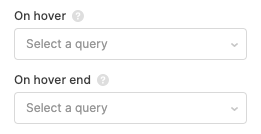
Retool now supports an onHover event on map markers, which lets you trigger a JavaScript query whenever a user hovers over a point. You can use this to open a modal, populate a tooltip container, or surface job details without a full page interaction. Here's how to set it up:
- Select your Mapbox map component on the canvas and open the Interaction settings panel.
- Find the
onHoverevent handler and set it to trigger a JavaScript query. - In your JS query, reference the hovered point's data — typically available via the event object — and use it to populate a modal or a set of text components. For example:
modal1.open()combined with setting a temporary state variable likecurrentMarker.setValue(event.data). - Inside your modal, bind your text or table components to
currentMarker.valueto display the relevant record details.
This pattern is especially effective for delivery apps where each marker represents a job. On hover, you can instantly surface the recipient name, address, delivery window, and status — all without leaving the map view.
How to Programmatically Select a Map Point with selectPoint()
The second major addition is the ability to select a map marker from a JavaScript query using map1.selectPoint(yourPoint). This means you're no longer limited to user clicks on the map itself — you can drive map selection from anywhere in your app.
- Build a table or list component that displays your delivery stops or locations alongside the map.
- Add a row click handler on the table that fires a JS query.
- In that query, call
map1.selectPoint(table1.selectedRow.data), passing in the data object that matches the point you want to highlight. Make sure the object includes the same coordinate fields your map is using (typicallylatitudeandlongitude). - The map will respond by selecting and centering on that marker, keeping your table and map in sync without any manual user interaction on the map itself.
This is a game-changer for dispatcher-style interfaces where an operator is working through a list of jobs and needs the map to reflect their current focus automatically.
What's Still Missing from Retool's Mapbox Integration
It's worth being honest about the gaps. As of now, the following features are not yet available in the Retool Mapbox component:
- Custom Mapbox Studio styles — you can't yet load a custom style URL from your Mapbox Studio account. You're limited to the default styles Retool exposes.
- Additional base map styles — Streets, Satellite, and Hybrid styles from Mapbox are not yet selectable in the component settings, though this has been flagged as a desired addition.
- Encoded polyline rendering — if you're working with route data encoded as a polyline string (common with Google Maps Directions API or similar services), there's currently no built-in way to decode and render that on the Retool Mapbox map. This is not on the roadmap yet, so you'd need a workaround via a JS query that decodes the polyline and plots individual coordinates as separate points.
- Fly-to animations and 3D features — smooth camera transitions and 3D terrain/building views from the Mapbox GL JS library are not exposed in the Retool component yet.
- User location display — showing the current user's geolocation on the map is also not natively supported.
Workarounds While You Wait
For teams that need polyline rendering or custom styles right now, the most practical path is embedding a Custom Component in Retool using an iframe or the Custom Component framework. This lets you run a full Mapbox GL JS implementation in the browser, pass data in from Retool queries, and emit events back to the parent app. It's more setup work, but it unlocks the full Mapbox GL JS API including flyTo, polylines, and custom styles.
For custom map styles, you can also evaluate whether Retool's built-in style options (once Streets and Satellite are added) will be sufficient, or whether you truly need a branded Mapbox Studio style. For most internal tools, the default styles are fine.
The Bottom Line
The Retool Mapbox map component has made meaningful progress — onHover query triggers and map1.selectPoint() are real, usable features that unblock a large class of location-based internal tools. If you're building a delivery tracker, fleet management dashboard, or field operations app, these two additions alone can significantly improve the UX. For more advanced needs like custom styles, polylines, or animations, plan for a Custom Component implementation until native support arrives.
Ready to build?
We scope, design, and ship your Retool app — fast.