Tutorials
How to Loop Through an Array and Trigger an API for Each Row in Retool
If you've ever needed to loop through an array in Retool and trigger an API call for each row, you're not alone. A common use case is firing a Twilio Studio flow for every phone number in a Google Sheet-backed table. Retool doesn't have a built-in "run for each row" button, but a Run JS Code query with additionalScope gets the job done cleanly. Here's exactly how to set it up.
Why You Can't Just Trigger One Query Per Table
Retool queries are designed to run once with a fixed set of parameters. If your API endpoint — like the Twilio Studio Executions REST API — only accepts a single recipient per request, you need to call it once per row, not once per table. The trick is to drive that repetition from JavaScript, not from Retool's GUI query settings.
Step 1: Set Up Your API Query with a Dynamic Parameter
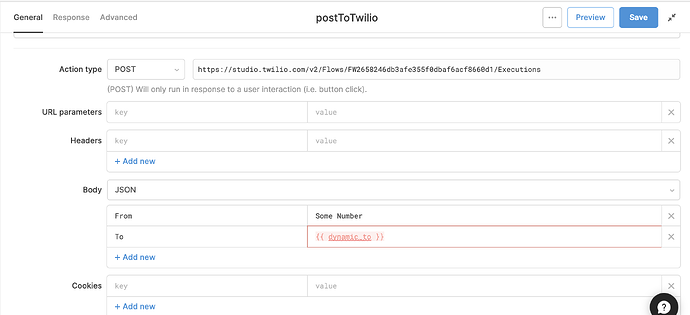
First, create a REST API query that hits your endpoint — in this example, the Twilio Studio Executions endpoint:
https://studio.twilio.com/v2/Flows/YOUR_FLOW_SID/Executions
Add your required body or query parameters. For Twilio, that's From and To. In the To field, use a Retool template variable that you'll inject dynamically from JavaScript:
{{ dynamic_to }}
Don't worry that it shows as red or undefined — it will only resolve when the JavaScript query triggers it with a value passed via additionalScope. That's by design.
Step 2: Add Authentication Headers Correctly
If you're using Twilio's Basic Auth, you need to add an Authorization header manually in your REST query. A common mistake is labeling the header AuthToken — Twilio will reject this. The correct format is:
Header name: Authorization
Header value: Basic YOUR_BASE64_ENCODED_CREDENTIALS
Make sure the word Basic is included before your encoded credentials. If you're using a preconfigured Retool REST API resource with authentication already set up, you can skip this step.
Step 3: Write the JavaScript Loop Query
Now create a Run JS Code query. This is where the loop lives. Assuming your Google Sheets query is named getUsers, the code looks like this:
getUsers.data.forEach(row => {
twilioQuery.trigger({
additionalScope: {
dynamic_to: row.phone_number
}
});
});
Replace getUsers with your actual query name, twilioQuery with the name of your REST API query from Step 1, and row.phone_number with the actual column key that holds the phone numbers in your dataset.
Here's what's happening: forEach iterates over every row returned by your Google Sheets query. For each row, it triggers the Twilio API query and passes the phone number through additionalScope. That scope makes dynamic_to available inside the REST query's template variables for that specific execution.
Step 4: Connect the JS Query to a Button
Drop a Button component onto your canvas. In its event handler, set the action to Trigger query and select your Run JS Code query. Now when a user clicks the button, Retool runs the loop and fires one API call per row — sequentially, one number at a time, exactly what Twilio expects.
Debugging: Why Is dynamic_to Always Undefined?
If you open your Twilio REST query and try to run it directly from the query editor, dynamic_to will always appear red and undefined. This is expected behavior. The variable only gets a value when the JavaScript query triggers it and passes additionalScope. To verify it's working correctly, run the JS query and check the browser console — you should see the resolved value of dynamic_to for each iteration.
Key Concepts to Remember
- Iterate over query data directly — use
queryName.data.forEach()instead of looping through table component state. The query data is the source of truth. additionalScopeis the bridge — it lets your JavaScript pass per-row values into a query's template variables at trigger time.- Dynamic variables will look broken until runtime — a red
{{ dynamic_to }}in the query editor is normal. It resolves only when called from JS with scope. - Auth headers must use the exact expected key — for Twilio and most REST APIs, that's
Authorization, notAuthTokenor anything custom. - One JS query drives everything — keep your REST query simple and dumb; let the JS query handle the looping logic.
When to Use This Pattern
This forEach + additionalScope pattern works any time you need Retool to make one API call per row. Common use cases include sending bulk SMS or emails, syncing rows to a third-party CRM one record at a time, triggering individual webhook payloads per user, or processing a queue of jobs where each item needs its own API call. It's one of the most reusable patterns in Retool scripting — once you understand it, you'll reach for it constantly.
The key insight is that Retool queries aren't loops by themselves — but JavaScript is. Combining a clean REST query with a thin JS wrapper gives you full control over iteration without needing an external automation tool like Zapier or Integromat to handle the repetition for you.
Ready to build?
We scope, design, and ship your Retool app — fast.