Tutorials
Retool FilePicker parsedValue Returns a 2D Array: CSV Fix
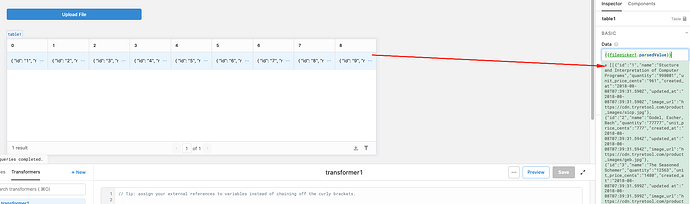
If you followed Retool's official tutorial for uploading and parsing a CSV file — and your filepicker.parsedValue is returning a 2D array instead of a flat list of rows — you've hit one of the most common stumbling blocks in Retool's file upload workflow. The fix is straightforward, but the official docs have historically left out two critical steps that cause this exact problem. Here's everything you need to know.
Why Does Retool's FilePicker Return a 2D Array?
When you use the FilePicker or File Button component in Retool and enable CSV parsing, the component wraps the parsed result in an outer array — one array per uploaded file. So even if you upload a single CSV, parsedValue returns something like [[{row1}, {row2}, {row3}]] rather than [{row1}, {row2}, {row3}]. This is the default behavior, and it exists to support multi-file uploads. The problem is that Retool's own tutorial CSV (books.csv) triggers this behavior, yet the docs originally referenced {{filepicker1.parsedValue}} without accounting for the extra nesting — leaving developers staring at an empty table or a broken query at 11pm.
Step 1: Enable "Parse Files" in the Inspector
Before parsedValue returns anything useful at all, you need to manually turn on a toggle that the official tutorial doesn't mention. Here's how:
- Select your
FilePickerorFile Buttoncomponent on the canvas. - Open the Inspect panel on the right side.
- Find the Parse files toggle and switch it on.
Without this toggle enabled, parsedValue will return an empty array [] regardless of what file you upload. This step is not optional — it's the reason many developers see parsedValue returning nothing at all, even after a successful file upload. Note that this toggle may not work correctly in all browsers: Safari in particular has been reported to silently fail to populate parsed values even with the toggle enabled. Use Chrome or Firefox for the most reliable results.
Step 2: Index Into the 2D Array with parsedValue[0]
Once Parse files is enabled and your CSV is uploading, the next issue is the 2D array. Instead of referencing:
{{filepicker1.parsedValue}}
You need to reference:
{{filepicker1.parsedValue[0]}}
The [0] index unwraps the outer array and gives you the flat array of row objects that your table component or bulk insert query expects. Without it, you're passing a nested array into a component that doesn't know how to handle it, which results in a broken table or a query error.
How to Wire Up a Full CSV Upload and Insert Flow
Here's a working end-to-end setup once both fixes are in place:
- Add a
FilePickercomponent to your Retool app and rename it something descriptive likecsvUpload. - In the Inspect panel, enable the Parse files toggle.
- Add a Table component and set its data source to
{{csvUpload.parsedValue[0]}}to preview the uploaded rows. - Create a new database query (e.g., a bulk insert) and reference
{{csvUpload.parsedValue[0]}}as your data input. - Add a Button component that triggers the query on click.
With this setup, your users can upload a CSV, preview the parsed data in the table, and confirm before committing the insert — a clean, production-ready pattern.
What If parsedValue Still Shows an Empty Array?
If you've enabled Parse files and are using parsedValue[0] but still see an empty array [] in the model browser, try the following:
- Check your browser: Switch to Chrome or Firefox. Safari has known issues with Retool's file parsing behavior.
- Re-upload the file: Sometimes the model browser doesn't reflect the evaluated value in real time. Try triggering the upload again and check if your query or table actually receives data — it may be evaluating correctly behind the scenes even if the inspector shows
[]. - Check for component naming conflicts: If you have multiple file components on the page, make sure you're referencing the right one by its exact component name.
- Inspect the raw value: Add a Text component with content
{{JSON.stringify(csvUpload.parsedValue)}}to see the actual evaluated output rather than relying on the model browser display.
The Bottom Line
Retool's CSV upload flow works well once you know the two things the tutorial originally left out: you must enable the Parse files toggle in the inspector, and you must use {{filepicker1.parsedValue[0]}} — not parsedValue alone — to access your row data. The 2D array behavior is by design to support multi-file uploads, but for the standard single-file CSV use case, indexing with [0] is always the right move. Save this page for the next time a colleague hits the same wall.
Ready to build?
We scope, design, and ship your Retool app — fast.