Guides
Retool Custom Authentication Not Working in Workflows: Fix & Workaround
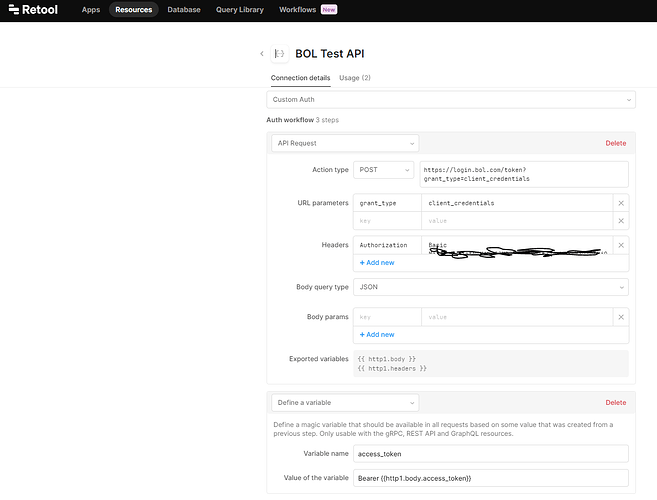
If you've set up a resource with custom authentication in Retool and everything works perfectly in the app builder but fails silently inside a Retool Workflow, you've run into one of the most frustrating undocumented limitations on the platform: Retool custom authentication not working in workflows is a confirmed, unresolved issue — not a misconfiguration on your end. Here's what's going on and how to work around it right now.
What Is Custom Authentication in Retool?
Retool's custom authentication lets you define your own token-fetching flow for a resource. Instead of relying on built-in OAuth or API key handling, you write a small authentication workflow that fires when a token is missing or expired. You typically store the result as access_token and track expiry with an expires_in variable. This pattern is common for APIs that use short-lived JWTs, proprietary SSO tokens, or non-standard OAuth flows.
In the Retool app builder, this works well. The platform detects an expired token, runs your auth flow, stores the new token, and retries the original request — all transparently. The problem is that this reauthentication loop simply does not trigger inside Retool Workflows.
Why Custom Auth Fails to Reauthenticate in Retool Workflows
According to Retool's own community team, resources with custom authentication are not currently supported in Workflows. The custom auth flow — the logic that detects token expiry and fetches a new one — is not executed in the Workflow runtime. So when your time-based token expires mid-workflow, the subsequent API calls fail silently or return unauthorized errors, and the workflow never attempts to reauthenticate.
This is particularly confusing because:
- The resource appears available and selectable inside the Workflow editor.
- Workflows that ran during Retool's early beta period reportedly worked with custom auth, leading users to assume it was supported.
- There is no in-app warning or disclaimer when you attach a custom-auth resource to a Workflow step.
- The Retool documentation did not (as of the last community reports) explicitly state this limitation.
The result: you spend hours debugging your token expiry logic, your expires_in comparisons, and your conditional branching — only to find the reauthentication step is never called at all.
How to Work Around Custom Auth in Retool Workflows Today
Until Retool ships native custom auth support for Workflows, the most reliable workaround is to embed the authentication logic directly inside your Workflow. Instead of relying on the resource to handle token refresh automatically, you manually fetch and inject the token as part of the Workflow's own step sequence.
Here's the step-by-step approach:
- Step 1 — Fetch a fresh token: At the start of your Workflow (or just before any authenticated API call), add a
REST Queryblock that calls your auth endpoint directly. Pass your client credentials and retrieve the token in the response. - Step 2 — Store the token in a variable: Use a
Set Variableblock (or capture it inline) to store the returnedaccess_tokenvalue. You can also storeexpires_inif you want to add conditional logic later. - Step 3 — Inject the token into downstream requests: For each API call in your Workflow that requires authentication, manually set the
Authorizationheader toBearer {{your_token_variable}}. Do not rely on the resource-level custom auth to do this for you. - Step 4 — Handle token expiry conditionally (optional): If your Workflow is long-running or loops over many records, add a conditional block that checks whether the token is about to expire and re-fetches it before proceeding. Compare a stored timestamp against
Date.now()to determine if a refresh is needed.
This approach is admittedly more manual than the resource-level custom auth flow, but it is predictable, debuggable, and fully supported within the current Workflow runtime.
What About Using a Retool DB or State Variable to Cache the Token?
Some teams have extended the workaround above by persisting the token and its expiry timestamp in Retool DB or an external key-value store. At the start of each Workflow run, you query the stored token, check if it's still valid, and only re-fetch if it has expired. This is especially useful if your auth endpoint is rate-limited or if token generation is slow. The tradeoff is added complexity and an extra dependency, so evaluate whether your auth endpoint can handle per-run token requests before over-engineering this.
Is Retool Planning to Fix This?
Yes — Retool's team has confirmed this is on the product roadmap, but as of the most recent community updates, it remains in the backlog and is not yet prioritized for an upcoming release. There is no public ETA. If this feature is critical for your team, the best way to accelerate it is to open a support ticket directly with Retool and ask your account manager to add weight to the internal feature request.
In the meantime, the in-workflow manual auth pattern described above is the only fully reliable solution. It's not elegant, but it works — and it gives you more explicit control over your token lifecycle than the automatic reauthentication mechanism would anyway.
Key Takeaways
- Retool custom authentication does not reauthenticate automatically inside Workflows — this is a known platform limitation, not a bug in your logic.
- Your
access_token,expires_in, and token expiry checks may all be correct; the issue is that the custom auth flow is never invoked by the Workflow runtime. - The fix is to manually fetch and inject your auth token as dedicated steps within the Workflow itself.
- Retool has acknowledged this gap and has it on the roadmap, but there is no confirmed release date.
If you're building production Workflows on Retool that hit APIs requiring custom authentication, implement the manual token injection pattern now and watch the community thread for updates on native support.
Ready to build?
We scope, design, and ship your Retool app — fast.