Guides
Retool: Copy Rich Text to Clipboard Without HTML Tags
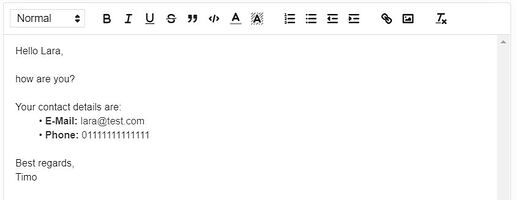
If you're trying to copy rich text from Retool to your clipboard without getting raw HTML, you've hit one of the platform's most frustrating limitations. When you call utils.copyToClipboard(richTextField.value), Retool copies the underlying HTML string — tags and all — so pasting into Gmail, Outlook, Word, or Google Docs gives you something like <p>Hello <b>Timo</b></p> instead of formatted text. This guide explains why it happens, what the community has tried, and the best workarounds available right now.
Why Does Retool Paste Raw HTML Instead of Rich Text?
Retool's utils.copyToClipboard() function only writes a single text/plain MIME type to the clipboard. Rich text copy — the kind that lets you paste formatted content into Word or an email client — requires writing a text/html MIME type alongside the plain text entry. Browsers support this natively through the navigator.clipboard.write() API using a ClipboardItem object, but Retool does not expose navigator.clipboard.write() to app scripts. That's the root cause. The rich text field stores its content as an HTML string internally, and without a way to push that string to the clipboard as text/html, every paste target receives it as literal characters rather than rendered formatting.
What utils.copyToClipboard() Actually Does
When you write a button's event handler like this:
utils.copyToClipboard(richTextField.value);
Retool takes whatever string richTextField.value returns — which is an HTML string such as <p>Hello <strong>world</strong></p> — and places it on the clipboard as text/plain. Any application that reads the clipboard, including Word and every major email client, then displays that string literally. There is currently no second argument or option flag on utils.copyToClipboard() to change this behavior.
Workarounds the Community Has Tried (and Why They Fall Short)
- Clipboard event listener +
document.execCommand('copy'): Some users attempted to attach acopyevent listener, callevent.clipboardData.setData('text/html', value), and then triggerdocument.execCommand('copy'). This pattern works in a normal browser context, but Retool's sandbox blocksdocument.execCommandfrom being triggered reliably inside script runners. ClipboardItem+utils.copyToClipboard(): Passing aClipboardItemblob directly intoutils.copyToClipboard()does not work because the function is not a wrapper aroundnavigator.clipboard.write()— it only accepts a string.- Injecting a hidden
<textarea>and selecting it: Creating a DOM element withdocument.createElement('textarea'), setting itsinnerHTML, and then passing the element toutils.copyToClipboard()also fails for the same reason — the utility only reads string values. - Ctrl + Shift + V (paste without formatting): This shortcut does the opposite of what's needed. It strips formatting on paste rather than preserving it, which doesn't help when the goal is to paste with rich text intact.
The short version: every DOM-level workaround runs into Retool's sandboxed script environment, and the utility function itself doesn't support text/html MIME types. Users migrating from AppSmith have noted this as a specific regression, since AppSmith exposes clipboard write access that enables exactly this pattern.
The Only Reliable Workaround Right Now
Until Retool ships native rich text clipboard support, the most practical approach for use cases like template mail builders is to route the copy action through an intermediate step:
- Display the HTML in a rendered preview and let users select + copy manually: Render the HTML string inside an
HTMLcomponent in Retool. The component renders the markup visually. Users can then select the rendered text with their mouse and copy it withCtrl+C/Cmd+Cthe normal way. The OS-level copy captures the rendered DOM selection — including formatting — rather than the raw string. This is the only method that reliably produces atext/htmlclipboard entry today. - Copy to a web-based destination first: If the final destination is Gmail or another browser-based email client, paste the raw HTML into a tool like JSFiddle or a simple custom HTML page, render it there, then copy and paste the rendered version into the email. Not ideal, but functional for low-volume use.
- Send directly via API instead of clipboard: If your template mail builder's end goal is sending emails, consider skipping the clipboard entirely. Use a Retool resource connected to SendGrid, Mailgun, or your SMTP provider to send the composed HTML email directly from a button click. This removes the copy-paste step altogether and is arguably a better user experience for internal tools.
How to Render Rich Text in an HTML Component for Manual Copy
- Add an HTML component to your Retool canvas.
- Set its HTML source to
{{richTextField.value}}so it mirrors the rich text field's current content. - Instruct users to click inside the HTML component, press
Ctrl+A/Cmd+Ato select all rendered content, and thenCtrl+C/Cmd+Cto copy. - The clipboard will now contain the formatted version, and pasting into Word, Gmail, or Outlook will preserve bold, italics, lists, and other formatting.
It's an extra click compared to a one-button copy, but it works today without any hacks.
What Retool Needs to Add to Fix This Properly
The cleanest fix would be extending utils.copyToClipboard() to accept an options object with an as_html flag, for example: utils.copyToClipboard(richTextField.value, { as_html: true }). Internally, this would use navigator.clipboard.write() with a ClipboardItem containing both text/html and text/plain entries — exactly the pattern that works in vanilla JavaScript. Alternatively, exposing navigator.clipboard.write() directly to Retool script environments would let developers handle it themselves. Both approaches have been requested in the official Retool community thread and the feature request has been escalated to the dev team.
Bottom Line
Retool's utils.copyToClipboard() copies plain text only — it doesn't support text/html MIME types, so rich text fields always paste as raw HTML in external applications. The most reliable workaround today is rendering the HTML in a Retool HTML component and letting users copy from the rendered output manually. If your use case is email sending, skip the clipboard entirely and fire the email via API from a button. Watch the official feature request thread for updates on native support.
Ready to build?
We scope, design, and ship your Retool app — fast.