Tutorials
How to Trigger a Retool Confirmation Modal in a JS Query
If you've ever tried to trigger a Retool confirmation modal inside a JS query — the same way utils.showNotification() works — you've probably hit a wall. There's no built-in utils.showConfirmation() method in Retool today, but there are real, working patterns that get you 90% of the way there. This post breaks down both approaches so you can ship your feature tonight.
Why There's No utils.showConfirmation() in Retool (Yet)
The Retool community has been asking for a utils.showConfirmation() method — something analogous to utils.showNotification() — that lets you pause a JS query mid-execution, prompt the user, and branch logic based on their response. As of now, Retool doesn't expose this as a native utility. A utils.confirm() method has been floated in community threads, but it is not a real built-in function and will not work if you try to call it. Don't waste time debugging it.
That said, Retool does give you two legitimate paths to get confirmation behavior inside your query logic.
Option 1: Use Retool's Built-In "Confirm Before Running" Query Setting
The simplest approach requires zero custom code. Retool has a native setting on any query that prompts the user for confirmation before the query executes. Here's how to set it up:
- Open the query you want to protect (e.g., a destructive
deleteEmployeeQuery). - Go to the Advanced tab in the query editor.
- Enable the "Confirm before running" toggle.
- Set your confirmation title and description text in the fields provided.
When this query is triggered — whether by a button click or from another JS query via .trigger() — Retool will automatically show a confirmation dialog before executing. If the user cancels, the query returns undefined instead of running. That return value is something you can actually use.
How to Handle the Cancel Response in a Wrapper JS Query
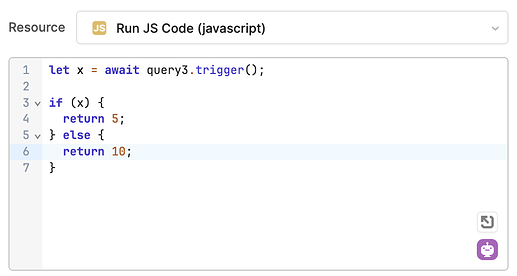
This is where it gets interesting. Because a cancelled query returns undefined, you can wrap your confirmation-protected query inside a JS query and branch on the result. Here's the pattern:
let result = await coolButDestructiveQuery.trigger();

if (result) {
  // Query ran successfully — handle the happy path
  return result;
} else {
  // User cancelled — undo state changes, notify the user
  mySwitch.setValue(false);
  return utils.showNotification({
    title: "Cancelled",
    description: "No changes were made.",
    notificationType: "info",
  });
}
This pattern is especially useful when a UI element like a toggle switch or dropdown triggers a query. If the user hits cancel, you can programmatically reset the component state so the UI doesn't drift out of sync with the actual data.
Option 2: Build a Lightweight Modal Confirmation Flow
If you need more control — custom button labels, themed colors, or multi-step confirmation — you can wire up a modal component to act as your confirmation dialog. This is more setup but gives you the most flexibility.
- Add a Modal component to your app and design it with a title, description, and two buttons:
ConfirmandCancel. - In your JS query, open the modal using
confirmationModal.open(). - Store any pending changeset data in a temporary state variable before opening the modal.
- Wire the Confirm button to trigger the actual destructive query, passing the stored changeset.
- Wire the Cancel button to close the modal and optionally reset any UI state.
This is the approach you'll need for things like an employee termination flow, where you might collect a date in one modal, then confirm the action in a second. It's more steps, but it gives you full control over styling, sequencing, and what happens on both confirm and cancel paths.
Which Approach Should You Use?
Use the "Confirm before running" query setting when you want a fast, zero-code confirmation gate on a single query and you don't need custom styling. Use the modal component approach when you need to collect additional input alongside the confirmation, apply custom themes, or chain multiple steps together. For most standard "are you sure?" scenarios on destructive actions — deletes, bulk updates, status changes — the built-in query confirmation setting paired with a wrapper JS query is the fastest path to production.
What's Coming: A Native utils.showConfirmation() Method
Retool's team has acknowledged this gap and indicated that turning the confirmation behavior into a proper utils method is feasible. Once that ships, you'd be able to call something like the following directly inside any JS query:
await utils.showConfirmation({
  title: "Please Confirm",
  description: "Are you sure you want to terminate this employee?",
  acceptLabel: "Confirm",
  cancelLabel: "Cancel",
});
Until that's available natively, the wrapper pattern and the modal component approach are your best tools. Both are production-ready and used by Retool builders in real apps today.
Key Takeaways
utils.showConfirmation()andutils.confirm()are not real Retool utility methods — don't use them.- Use Retool's native "Confirm before running" query setting for simple confirmation gates.
- Wrap the protected query in a JS query to branch on cancel using the
undefinedreturn value. - Use a Modal component for advanced confirmation flows that need custom styling or multi-step logic.
- Store pending state in temporary state variables before opening a confirmation modal so you can safely pass data through to the confirmed action.
Ready to build?
We scope, design, and ship your Retool app — fast.