Tips
Retool clearSelection Not Working on a Hidden Tab? Here's Why
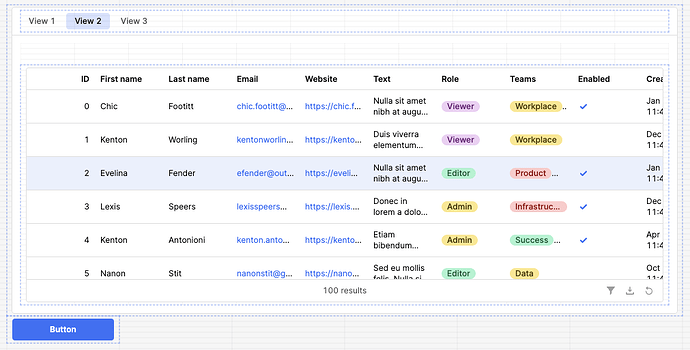
If you've ever fired tableName.clearSelection() from a button and then switched tabs only to find the row is still selected when you come back, you've hit a confirmed Retool bug. Retool's clearSelection() method silently fails when the target table is on a hidden tab, inside a collapsed drawer, or tucked inside a modal that isn't currently open. This is one of those maddening issues that looks like a logic error in your own app — but it isn't. Here's everything you need to know.
What Is the clearSelection() Bug in Retool?
The bug is straightforward: tableName.clearSelection() works perfectly when the table component is visible on screen. The moment that table is inside a Tabbed Container and rendered on a tab the user isn't currently viewing, the method call does nothing. No error is thrown, no warning appears in the console — it just silently fails. When the user eventually navigates back to the tab containing the table, the previously selected row is still highlighted.
The same behavior has been confirmed in other hidden-component contexts, including:
- Tables nested inside a drawer frame that is currently closed
- Tables inside a hidden modal that hasn't been opened yet in the current session
- Any table that Retool has not yet fully rendered in the DOM because its parent container is not visible
The root cause is that Retool defers rendering (or pauses reactivity) for components that are not currently visible. When clearSelection() is called, there's no live component instance to receive the instruction, so the call is dropped entirely.
Why This Trips Up So Many Retool Developers
The typical scenario looks like this: you have a multi-tab interface where Tab 1 contains a search form and Tab 2 contains a results table. A user selects a row in the results table, navigates back to Tab 1 to run a new search, and you want to programmatically clear the old selection so stale data doesn't carry over. You write an event handler that calls resultsTable.clearSelection() when the new query runs — completely reasonable. But because the table is now on the non-visible tab, the selection never clears, and your downstream logic (row-dependent buttons, conditional panels, etc.) breaks in confusing ways.
Multiple developers in the Retool community forum have reported this across different container types, and Retool's own support team has acknowledged it as an open bug with an internal ticket. As of early 2024, it has not yet been patched.
How to Work Around Retool clearSelection Failing on Hidden Tabs
Until Retool ships a fix, here are the most reliable workarounds developers are using in production apps today.
Workaround 1: Force a Tab Switch Before Clearing
The most direct workaround is to programmatically switch to the tab containing the table before calling clearSelection(), then switch back. You can chain event handlers or use a JavaScript query to do this:
- In your button's event handler, add an action to set
tabbedContainer.selectedTabto the tab index that contains the table. - Immediately after, call
tableName.clearSelection(). - Optionally, switch back to the original tab index in the same handler chain.
This forces Retool to render the table component before executing the method, which gives clearSelection() a live target. The tab switch is nearly instantaneous and usually invisible to the user if done within a single scripted sequence.
Workaround 2: Use a Temporary State Variable as a Selection Override
Instead of relying on clearSelection() at all, store the selected row in a tempState variable and treat that as your source of truth for downstream logic. When you want to "clear" the selection, simply set the tempState variable to null or an empty object. Wire all your dependent components to read from tempState rather than tableName.selectedRow. This fully sidesteps the bug because you're never calling the broken method.
Workaround 3: Re-run the Table's Data Source Query
In some configurations, triggering a re-run of the query that populates the table will reset the component's selection state as a side effect. This isn't guaranteed and depends on how your app is configured, but it's a low-effort thing to try. Call yourTableQuery.trigger() as part of the event handler and test whether the selection resets on re-render.
How to Confirm You're Hitting This Bug
If you're unsure whether this is a configuration issue or the known bug, run this quick test:
- Place a button and a table on the same tab inside your
Tabbed Container. - Wire the button to call
tableName.clearSelection(). - Select a row, then click the button while on the same tab — the selection should clear.
- Now navigate to a different tab and click the same button — if the selection persists when you return, you've confirmed the bug.
What to Do While Waiting for a Fix
Log a +1 on the Retool community thread so the internal ticket gets prioritized. In the meantime, Workaround 1 (forcing a tab switch) is the most reliable fix for standard tabbed layouts. Workaround 2 (using a tempState variable) is the most robust solution if your app has complex selection logic or if the table lives inside a modal or drawer where switching to it programmatically is less practical.
This is a frustrating bug precisely because everything looks correct in your code — clearSelection() is a legitimate method, the syntax is right, and Retool gives you zero feedback that the call failed. Knowing it's a platform-level issue rather than a logic error in your app saves you hours of debugging.
Ready to build?
We scope, design, and ship your Retool app — fast.