Tutorials
How to Await a Retool Query Before Running the Next Step
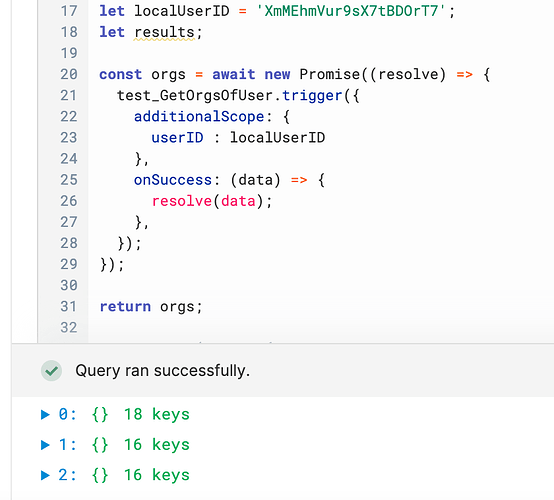
If you've ever tried to await a Retool query to finish before moving on to the next step, you've likely run into a frustrating bug: the first time you preview your JavaScript query, the data is empty or undefined. The second time, it works perfectly. That's a classic race condition — your code is reading QueryName.data before the query has actually resolved. Here's how to fix it for good.
Why Retool Query Data Is Undefined on the First Run
When you call QueryName.trigger() in a Retool JavaScript query, it kicks off an asynchronous operation. The problem is that QueryName.data — the property you're used to reading — reflects the last completed result stored on the query object, not the result of the trigger you just fired. So if the query hasn't run yet, or if it hasn't finished by the time the next line executes, QueryName.data is either stale or empty.
This is why the pattern below does not work reliably:
const promise = Promise.resolve(await GetOrgsOfUser.trigger({ additionalScope: { userID: localUserID } }));
var orgs = GetOrgsOfUser.data.map(row => ({ Name: row.displayName }));
Even with await on the trigger, reading GetOrgsOfUser.data immediately afterward still pulls from the query object's stored state — not the fresh result. You need to capture the data directly from the trigger's success callback instead.
The Correct Pattern: Wrap the Trigger in a Promise with onSuccess
Retool's .trigger() method accepts an onSuccess callback that fires with the fresh query result the moment the query completes. By wrapping the trigger in a new Promise() and calling resolve(data) inside onSuccess, you can properly await the result before proceeding.
Here is the working pattern:
let localUserID = 'XmMEhmVur9sX7tBDOrT7';
const orgs = await new Promise((resolve) => {
GetOrgsOfUser.trigger({
additionalScope: { userID: localUserID },
onSuccess: (data) => {
resolve(data);
},
});
});
return orgs;
This pattern blocks execution at the await line until onSuccess fires and resolves the Promise. The value of orgs is the live query result — not QueryName.data — so it's always fresh and always available for whatever comes next.
Step-by-Step: Awaiting a Retool Query in a JS Query
- Step 1: Open your JavaScript query in Retool.
- Step 2: Remove any direct reads from
QueryName.datathat happen immediately after a.trigger()call. - Step 3: Wrap your
.trigger()call innew Promise((resolve) => { ... }). - Step 4: Inside the
onSuccesscallback, callresolve(data)to pass the fresh result into the Promise. - Step 5: Use
const result = await new Promise(...)to capture the resolved value. - Step 6: Use
resultfor all downstream logic — mapping, filtering, returning to the app, etc.
What About Mapping Over the Query Results?
If you need to transform the data — for example, reshaping rows into a specific format for a Retool Table component — you can do that immediately after the await resolves, using the captured variable rather than QueryName.data:
const orgs = await new Promise((resolve) => {
GetOrgsOfUser.trigger({
additionalScope: { userID: localUserID },
onSuccess: (data) => resolve(data),
});
});
const tableRows = orgs.map(row => ({
Name: row.displayName,
Photo: row.photoURL,
}));
return tableRows;
In many cases, you'll find the raw orgs array already has the shape you need and the .map() isn't necessary at all. Either way, the key is that all downstream logic runs after the Promise resolves — not before.
Why Not Just Use additionalScope and Read .data?
A common workaround is to pass additionalScope and rely on Retool's reactive system to update QueryName.data automatically. That works in some event-driven flows (e.g., a button triggering a query that then feeds a table via {{QueryName.data}} in the UI). But the moment you need to read and act on that data inside a JavaScript query programmatically — chaining queries, building dynamic values, returning processed results — you need the explicit Promise pattern described above.
Common Mistakes to Avoid
- Reading
QueryName.dataimmediately afterQueryName.trigger()— this is almost always a race condition. - Using
Promise.resolve(await QueryName.trigger())— the outerPromise.resolve()is redundant and doesn't help synchronize data access. - Placing downstream logic outside the async context — if you're not inside an
asyncfunction or usingawait, your code won't wait. - Forgetting that Retool JavaScript queries support top-level
await— you don't need to wrap everything in anasync IIFEunless you're calling this from a non-async context.
The Bottom Line
The fix for awaiting a Retool query before the next step is straightforward once you understand the root cause: never read QueryName.data synchronously after a trigger. Instead, wrap the trigger in a new Promise(), resolve it inside onSuccess, and await the Promise to get fresh, reliable data every single time — not just on the second run.
Ready to build?
We scope, design, and ship your Retool app — fast.