Tutorials
Retool App Localization: How to Add Multi-Language Translation
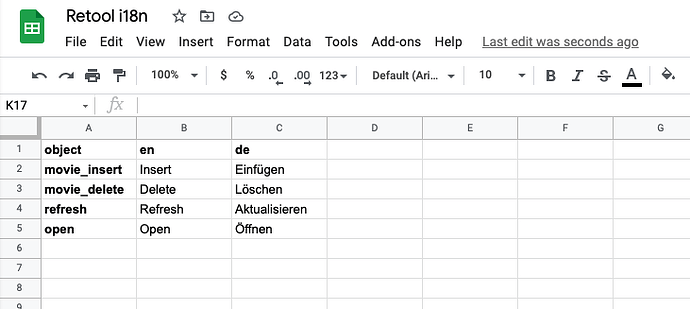
If you're building a Retool app for users across different regions, Retool app localization and translation is something you'll need to solve sooner or later. The good news: Retool gives you enough flexibility to wire up a clean, maintainable i18n system using tools you're likely already using — Google Sheets, a JS query, and the built-in moment.js library. Here's exactly how to do it.
Step 1: Store Your Translations in Google Sheets
The simplest and most maintainable approach is to use a Google Sheet as your translation source. Structure it like this:
- Column A (
object): The translation key — a unique identifier for each UI string (e.g.refresh,open,save). - Column B onward: One column per language, with the language code as the header (e.g.
en,pt,de).
Each row maps a key to its translated string in every supported language. Need to add a new language? Just add a column. Need a new string? Add a row. This structure keeps your translations out of your Retool app logic and easy for non-developers to update.
Step 2: Create a Cached JS Query to Build the Translation Map
Once your sheet is connected as a Retool resource, create a JavaScript query — call it i18n — that transforms the raw sheet data into a flat key-value map for the active language. Set it to run on page load and enable caching so it doesn't re-fetch on every component render.
The query should look something like this:
var app_language = app_language.value;
var translations = get_translations.data;
var mapping = {};
for (var i = 0; i < translations.length; i++) {
mapping[translations[i].object] = translations[i][app_language];
}
return mapping;
Here, app_language is a Retool state variable holding the user's selected language code (e.g. "pt" or "de"), and get_translations is your Google Sheets query. The output is a flat object where every key maps directly to the correct translated string.
Step 3: Reference Translations Throughout Your App
With i18n built and cached, referencing a translation anywhere in your app is a one-liner. Just use the Retool expression syntax to pull the value by key:
{{i18n.data.refresh}}— label for a Refresh button{{i18n.data.open}}— label for an Open button{{i18n.data.save}}— label for a Save button
Paste these expressions into any component's Label, Placeholder, Tooltip, or Text field. When the user switches language, refresh the i18n query and every component updates automatically.
How to Localize Dates and Calendar Components in Retool
Translation keys handle static UI strings, but dates need a different approach. Retool ships with moment.js built in, which supports locale-aware date formatting out of the box. Instead of displaying raw timestamps, wrap them in a moment expression:
{{moment(currentRow.createdAt).locale("pt").format("dddd D/MMM H:mm")}}
This turns a UTC timestamp into a fully localized string like Domingo 14/Ago 12:45 instead of Sunday 14/Aug 12:45. Swap "pt" for any valid moment.js locale code. You can even make the locale dynamic by replacing the hardcoded string with app_language.value so it follows the user's selected language automatically.
How to Translate Validation Messages and Select Options
For UI elements like selects inside modals — where you want to translate validation error messages or option labels — use the Validation section of the component. You can write a custom validation rule that references your i18n map directly, keeping error messages consistent with the rest of your app's language.
For example, in the validation message field of a Select component, use:
{{i18n.data.field_required}}
This ensures that even error states are properly localized — not just button labels and headings.
What About Toolbar and Navigation Elements?
Toolbar elements in Retool (like table action buttons or top-level nav items) follow the same pattern — their label fields accept expressions, so {{i18n.data.your_key}} works there too. The key is making sure every hardcoded string in your app has a corresponding row in your translation sheet.
Why This Approach Works Well for Retool Localization
- Single source of truth: All translations live in Google Sheets, not scattered across components.
- No performance hit: The JS query caches the translation map, so there's only one network call per language switch.
- Easy to scale: Adding a new language is just a new column in the sheet.
- Non-technical friendly: A translator or product manager can update strings in Google Sheets without touching Retool.
- Works everywhere: The
i18n.dataobject is accessible in any component expression, query, or transformer across your app.
If your Retool app needs to serve users in more than one language, this pattern — Google Sheets for translation storage, a cached JS query for the map, moment.js for dates — is the most pragmatic and maintainable approach available today. Set it up once, and scaling to additional languages becomes a spreadsheet task, not an engineering one.
Ready to build?
We scope, design, and ship your Retool app — fast.