Guides
Retool Additional Scope Linting Errors: What's Causing Them and How to Fix
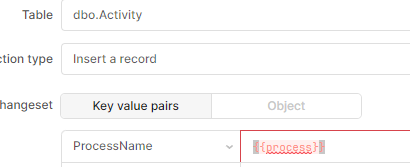
If you've ever used additionalScope in a Retool query, you've likely run into the frustrating experience of seeing red squiggly underlines in the code editor and error messages flooding your debug console — even when your query runs perfectly fine. This issue with Retool additional scope linting errors has tripped up a lot of developers, and for a while it was simply the "cost of doing business" with additional scope. Here's a full breakdown of what causes it, what Retool has fixed, and where gaps still remain.
What Is Additional Scope in Retool?
In Retool, additionalScope is a query property that lets you pass extra variables into a query at runtime — variables that aren't automatically available in the query's standard execution context. This is especially useful in reusable queries, module queries, or when pulling from a query library where the data context isn't implicitly defined. The problem is that Retool's built-in code editor doesn't inherently know about these runtime-injected variables, so it flags them as undefined — triggering linting errors and debug console noise.
Why Does Retool Flag Additional Scope Variables as Errors?
The code editor in Retool uses a static linter to check your JavaScript for potential issues before the query runs. When you reference a variable that's only available via additionalScope, the linter has no way to know that variable will exist at runtime. From its perspective, you're referencing something undefined — so it marks it red. The debug console takes it a step further and logs those references as actual errors, which makes it hard to distinguish real bugs from false positives caused by additional scope usage.
This is a particularly painful experience because the code works — the query runs correctly — but your console is full of red text every time you open the app. Developers have reported spending significant time second-guessing themselves, wondering if something is actually broken.
Is This a Bug or Expected Behavior?
It was both, at different points in time. Early on, Retool confirmed this was simply a limitation of how the linter worked — it had no mechanism to account for variables injected via additionalScope. The Retool team acknowledged it and flagged it for a fix. As of November 7, 2023, a fix was deployed to Retool Cloud. For Self-Hosted Retool instances, the fix shipped in the 3.22 release.
What Was Fixed and What Still Isn't
The fix addressed the most common case: when you define explicit additional scope on a query, the linter should no longer flag those variables as errors. However, community reports after the fix rolled out suggest it isn't complete across all query types. Specifically, two areas still show linting issues:
- Query input fields in GUI mode: The
additionalScopedeclaration property is not available when a query is in GUI mode (as opposed to code mode). This means developers using GUI-based query editors can't define additional scope in a way the linter understands, so errors persist. - Query Library and REST queries: The additional scope declaration property also appears to be missing from
Import from Query Libraryqueries and REST API queries, leaving those query types still prone to false-positive linting errors.
How to Minimize Additional Scope Linting Errors Right Now
While Retool continues to roll out improvements, here are the practical steps you can take today to reduce noise in your editor and console:
- Switch queries to code/JS mode where possible: The additional scope declaration property is currently only available in non-GUI query modes. If your query type supports a code view, switching to it gives you access to the
additionalScopefield and makes the linter aware of your injected variables. - Update queries as you touch them: Rather than doing a bulk migration, a practical approach is to add the proper
additionalScopedeclaration to each query whenever you're already editing it. This incremental approach keeps the work manageable. - Use the debug console filter: Retool's debug console allows you to filter by message type. While this doesn't fix the root cause, filtering out known false-positive sources can help you focus on real errors during development.
- Verify your Retool version: If you're on Self-Hosted, confirm you're running version 3.22 or later. If you're on an older release, upgrading is the fastest path to the partial fix that's already available.
- Test on Cloud if possible: If you have access to a Retool Cloud instance, you can use it to verify whether a linting error is a version-specific bug or a remaining gap in the fix, which helps you prioritize whether to wait or work around it.
What to Expect Going Forward
Retool has shown active engagement with this issue — the fix for Cloud and Self-Hosted is a meaningful step forward. The remaining gaps in GUI mode queries, REST queries, and Query Library imports are known and have been surfaced in the community. If you're hitting these specific cases, the best action is to upvote or comment on the original community thread so Retool's team can see continued demand for a complete fix.
In the meantime, don't let the red squiggles fool you — if your query runs correctly and only the linter is complaining, the issue is almost certainly a false positive tied to additionalScope variable injection, not an actual bug in your code. Keep an eye on Retool's release notes for further updates to linting support across all query types.
Ready to build?
We scope, design, and ship your Retool app — fast.