Tutorials
How to Query a Firestore Collection Group in Retool
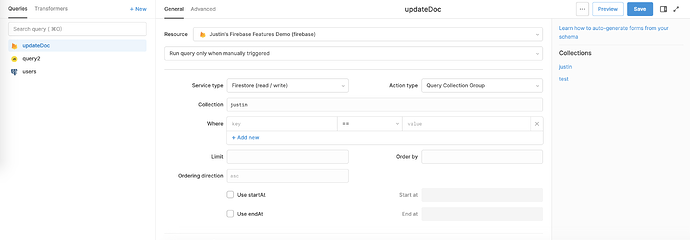
If you've ever tried to query a Firestore collection group in Retool — say, fetching every Users document across all Organizations without looping through parent documents one by one — you've probably hit a wall. The good news: Retool now natively supports Firestore collection group queries, and setting one up takes less than a minute once you know where to look.
What Is a Firestore Collection Group Query?
A collection group is the set of all collections that share the same name, regardless of where they live in your document hierarchy. If your Firestore schema looks like this:
Organizations/{org_id}/Users/{user_id}
…then the Users collection group includes every Users subcollection under every Organization document. A collection group query lets you retrieve all of those documents in a single request, without knowing the parent org_id values in advance. Google introduced this feature in Firebase in mid-2019, and Retool added native support for it shortly after.
Why the Old Workaround Was Painful
Before collection group support landed in Retool, the typical workaround looked something like this:
- Query the top-level
Organizationscollection to get allorg_idvalues. - Loop through each
org_idand fire a separate query againstOrganizations/{org_id}/Users. - Merge the results in a
transformeror with custom JavaScript.
This approach is brittle, slow, and burns Firestore read quota fast. It also means your Users data is always framed inside the context of a specific Organization — which breaks any use case where you need a global user view, audit log, or cross-org report.
How to Query a Firestore Collection Group in Retool (Step-by-Step)
Follow these steps inside any Retool app connected to a Firebase / Firestore resource:
- Step 1: Open or create a query in the query editor and select your Firebase resource.
- Step 2: In the Action Type dropdown, select
Query Collection Group. (Previously this dropdown only showed options likeFirestore - Get DocumentorFirestore - Query Collection.) - Step 3: In the Collection Group Name field, type or select the name of the subcollection you want to query — for example,
Users. Retool will surface all subcollection names it can detect, but you can also type a custom name if yours doesn't appear in the dropdown. - Step 4: Add any additional query parameters you need: filters (
whereclauses),orderBy, andlimitall work exactly as they do with standard collection queries. - Step 5: Hit Run. Retool returns a flat array of every matching document across all parent paths.
That's it. No chaining, no transformers to stitch results together, no worrying about which org_id you forgot to include.
Firestore Index Requirement — Don't Skip This
Firestore requires a collection group index before it will serve collection group queries in production. If you run the query and get a permission or index error, go to the Firebase console, navigate to Firestore → Indexes → Composite, and create a new index with the Collection Group scope set to your subcollection name (e.g., Users). Firebase will usually provide a direct link to create the missing index right inside the error message, so check your browser console or Retool's query error output first.
Filtering and Limiting Collection Group Results
Because a collection group query can return a large number of documents, you'll almost always want to apply constraints. Retool exposes the same query controls you'd use on a standard collection query:
- Filters: Add
whereconditions to narrow results — e.g., return onlyUserswhererole == "admin". - Limit: Set a numeric cap on returned documents to keep response times fast and read costs low. A limit of
500is a reasonable starting point for paginated tables. - Order By: Sort by any field present across the subcollection documents — useful when displaying results in a
Tablecomponent chronologically.
When to Use Collection Group Queries vs. Standard Collection Queries
Use a collection group query when you need a global, cross-parent view of data — admin dashboards, cross-organization reports, audit logs, or any feature where the parent document ID is irrelevant to the end user. Stick with a standard collection query when you're operating in the scope of a single known parent (e.g., loading all Users for the currently selected Organization), since scoped queries are faster, cheaper, and don't require a composite index.
A Note on the Raw Query Editor
If you ever run into a Firestore query pattern that Retool's UI doesn't expose yet — batched writes, complex compound filters, or anything that requires the full Firebase JS SDK — Retool also supports a raw query editor mode. This lets you write queries directly against the Firebase JS SDK and is worth knowing about as a fallback for advanced use cases beyond collection group queries.
Collection group queries are one of those Firestore features that unlocks entirely new data models. Now that Retool supports them natively, there's no reason to keep fighting chained queries just to get a flat view of your subcollection data.
Ready to build?
We scope, design, and ship your Retool app — fast.