Guides
Python Support in Retool Workflows: Setup Guide & Tips
Python support in Retool Workflows is officially here, and it changes what you can build inside Retool without ever leaving the platform. If you've been waiting to run pandas transforms, numpy computations, or scraping logic inside a Retool automation — this feature is built for exactly that. This guide covers how to get started, what libraries are available, how to feed results back into your Retool apps, and how to avoid the most common mistakes people hit first.
How to Add a Python Code Block in Retool Workflows
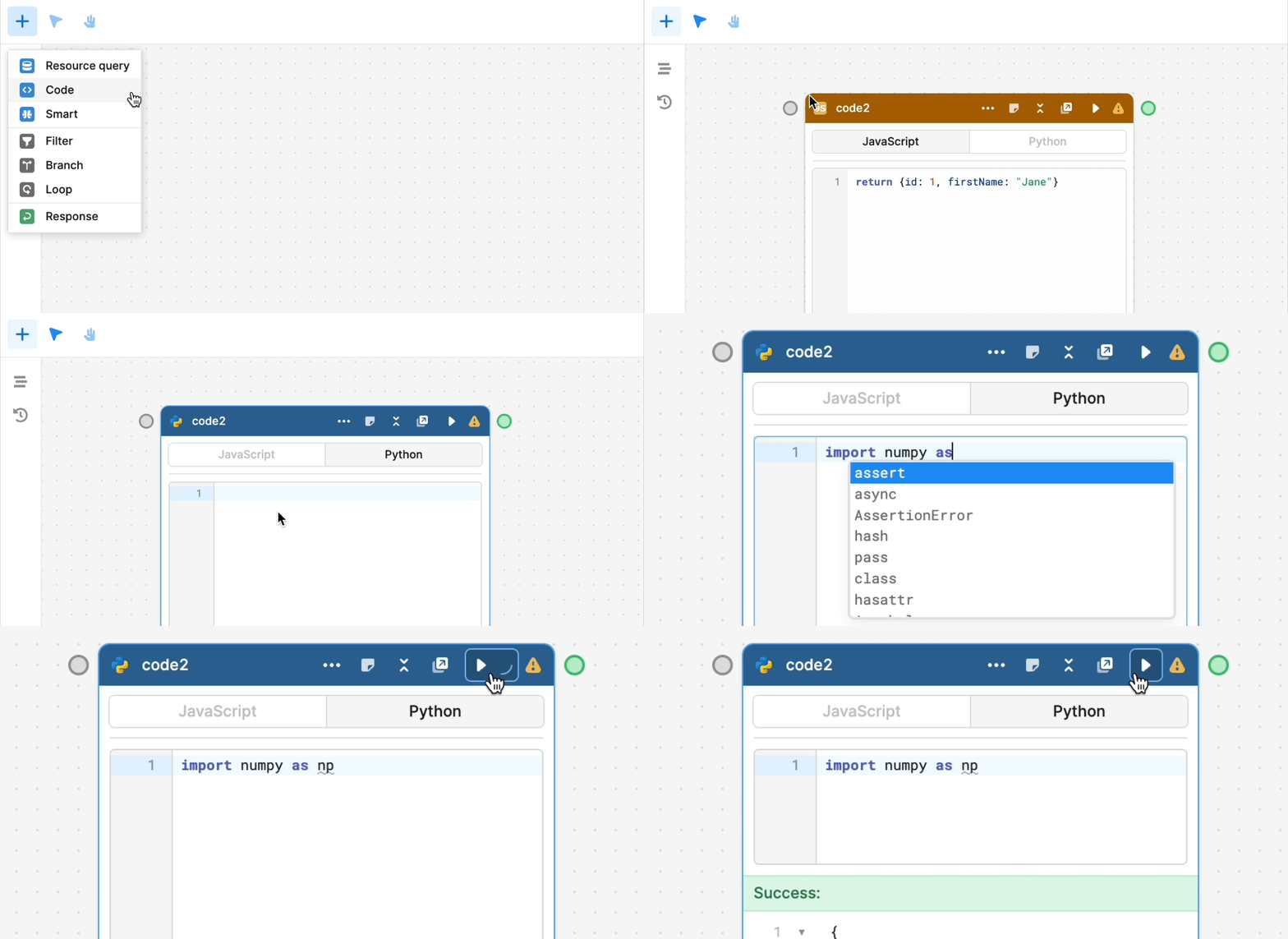
Getting Python running inside a Workflow is straightforward once you know where to look. Here's the step-by-step:
- Open or create a Retool Workflow from your dashboard.
- Drag a new block onto the canvas and select Code as the block type.
- In the code editor, click the Python tab (next to JavaScript) to switch languages.
- Write your Python logic directly in the editor. Auto-completion, inline linting, and context hints are all available out of the box.
- Click Run to execute and check the Data tab for your return value.
That's it. No environment setup, no package installs, no Docker containers. Retool handles the runtime for you.
Which Python Libraries Come Preinstalled?
Retool preinstalls 20+ Python packages so you're not starting from scratch. The key ones include:
numpy— numerical computing and array operationspandas— data manipulation and DataFrame transformationsscipy— scientific and statistical computingseaborn— statistical data visualizationrequests— HTTP calls to external APIs
If your workflow lives in an IDE or Jupyter notebook today, there's a good chance you won't need to change your imports at all. Just paste your logic in and run it.
How to Return Data from a Python Block (and Why Your Data Tab Might Be Empty)
This is the most common issue people hit when they first use Python in Retool Workflows: values show up in the Logs tab but the Data tab stays empty. The fix is simple — you have to explicitly return your value.
Here's a working example using the requests library:
- Define your function and logic as usual.
- Call the function and store the result:
result = send_request() - Add
return resultas the final line of your block — outside the function definition.
Without that top-level return statement, Retool doesn't know what value to surface as the block's output. print(result) will push to logs, but only return result populates the Data tab and makes the value available to downstream blocks in your Workflow.
For non-200 HTTP responses, returning None is fine — Retool will surface that as null in the Data tab rather than throwing an error.
How to Feed Python Results Back into a Retool App
One of the most powerful use cases for Python in Workflows is running server-side data processing and piping the output into a live Retool app. You can do this using the Webhook Response block:
- Build your Python logic in a code block — data cleaning, API aggregation, statistical analysis, etc.
- Pass the result to a Response block at the end of your Workflow.
- Trigger the Workflow via webhook from your Retool app and consume the response like any other query result.
This pattern is especially useful when your front-end Retool app needs heavy computation that would be slow or impossible to do client-side in JavaScript.
Can You Call Functions from Python Blocks?
Not yet — at least not in the initial release. Calling external Python functions or sharing logic between Python blocks isn't supported today. According to the Retool team, interoperability between Python and other block types is actively in development. For now, keep your logic self-contained within each code block.
Is Python Available for On-Premises Retool Deployments?
This is where things get nuanced. Python in Workflows launched first for Retool Cloud. For self-hosted / on-prem deployments, the rollout has been staggered:
- The feature was originally announced for
v2.113, but it was not fully included in the initial2.113.3release. - A private beta for on-prem Python support is available for teams that need it urgently and are willing to test and provide feedback.
- General availability for self-hosted instances is coming — but if you're blocked, reach out to Retool support directly to join the beta.
If you've updated to the latest on-prem version and still only see JavaScript as an option in code blocks, you haven't hit a bug — Python just hasn't been enabled for your instance yet. Contact your Retool account team or post in the community to get beta access.
What's Coming Next for Python in Retool
The current release is explicitly described as "just the beginning" by the Retool team. Based on community feedback and stated roadmap items, expect improvements in:
- Cross-block Python function calls and shared utilities
- Deeper interoperability between Python blocks and other Workflow block types
- Full general availability for on-prem / self-hosted deployments
If you're building something interesting with Python in Retool Workflows — especially around data pipelines, web scraping, or visualization — the Retool community is actively watching for feedback and real-world use cases. The faster teams share what they're building, the faster the roadmap moves.
Ready to build?
We scope, design, and ship your Retool app — fast.