Tutorials
How to Prefill a Retool Dropdown from a Query
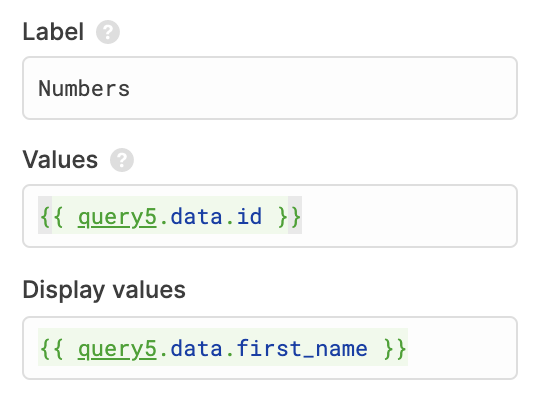
If you've ever tried to prefill a dropdown from a query in Retool and ended up staring at a blank select component or a broken reference, you're not alone. This is one of the most common stumbling blocks for new Retool builders, and the fix depends on one key detail: how your data source returns data. This guide covers every scenario — SQL queries, REST APIs, and the modern Mapped mode — so you can wire up your dropdown and move on.
Why Prefilling a Retool Dropdown from a Query Can Go Wrong
Retool queries don't all return data in the same shape. This is the root cause of most dropdown population issues. There are two common structures you'll encounter:
- Object of arrays (typical of SQL-based queries):
{ key1: [val, val], key2: [val, val] } - Array of objects (typical of REST APIs and NoSQL sources):
[{ key1: val, key2: val }, { key1: val, key2: val }]
When you reference queryName.data in a dropdown's values field, Retool needs a flat array — not a nested object, and not an array of objects. If your data isn't already in that shape, the dropdown will appear empty or throw an error. Understanding which format you're working with is the first step to fixing it.
Method 1: Object of Arrays (SQL Queries)
SQL queries in Retool typically return data as an object of arrays. If your query is called getProducts and returns a name column, your data looks like this:
{ name: ["Widget A", "Widget B", "Widget C"] }
To prefill the dropdown, set the Values field of your select component to:
{{ getProducts.data.name }}
That's it. Retool can directly iterate over that array and populate the dropdown options.
Method 2: Array of Objects (REST APIs and Other Sources)
If your data source returns an array of objects, direct key access won't work. You need to either use JavaScript's .map() method or Retool's built-in helper function formatDataAsObject().
Option A — Using .map():
{{ queryName.data.map(d => d.name) }}
This extracts the name field from every object in the array and returns a flat array of strings — exactly what the dropdown needs.
Option B — Using formatDataAsObject():
{{ formatDataAsObject(queryName.data).name }}
This Retool helper converts an array of objects into an object of arrays, matching the SQL format. After the conversion, you can access any column by key just like in Method 1. There's also a reverse helper — formatDataAsArray() — if you ever need to go the other direction.
Method 3: Using Mapped Mode (The Modern Way)
Retool's Mapped mode on the Select component is the cleanest and most flexible approach available today. Instead of manually reshaping your data, you point the component directly at your query and use {{ item }} references to define what each option displays and stores.
Here's how to set it up step by step:
- Select your dropdown (Select component) on the canvas.
- In the component inspector, switch the data source mode to Mapped.
- Set the Data source field to your query:
{{ queryName.data }} - Set the Label field to the property you want displayed:
{{ item.name }} - Optionally set a Caption for secondary display text:
{{ item.email }} - Set the Value field to what gets stored on selection:
{{ item.id }}
Mapped mode works natively with arrays of objects, so there's no need to transform your data first. It also makes your dropdown configuration much easier to read and maintain — especially when you come back to an app weeks later.
Quick Reference: Which Method Should You Use?
- SQL query, single column needed: Use
{{ queryName.data.columnName }} - REST API or array of objects, single column needed: Use
{{ queryName.data.map(d => d.columnName) }} - Any data source, full control over label/value/caption: Use Mapped mode with
{{ item.property }} - Need to convert array of objects to object of arrays: Use
formatDataAsObject(queryName.data).columnName
Common Mistakes to Avoid
A few things that trip people up when prefilling Retool dropdowns:
- Referencing
queryName.datadirectly without a key on a SQL query returns the whole object, not an array — always drill down to the specific column. - Forgetting to run the query on page load. If your query isn't set to run automatically, the dropdown will be empty when the app loads. Check the query's trigger settings.
- Using
.map()on a SQL object of arrays won't work as expected —.map()is for arrays of objects. Confirm your data shape first using the query's result panel. - Unique values only: If you need to deduplicate results (e.g., unique product names), handle that in your SQL query with
SELECT DISTINCTrather than trying to filter in the frontend.
Wrapping Up
Prefilling a dropdown from a query in Retool is straightforward once you know what data shape you're dealing with. For SQL queries, access the column directly on queryName.data. For REST APIs and other array-of-objects sources, use .map() or formatDataAsObject(). And for the most flexible, readable setup, reach for Mapped mode — it handles both shapes cleanly and gives you full control over labels, values, and captions without any transformation code.
Ready to build?
We scope, design, and ship your Retool app — fast.