Tutorials
How to Detect Dirty Form Fields in Retool
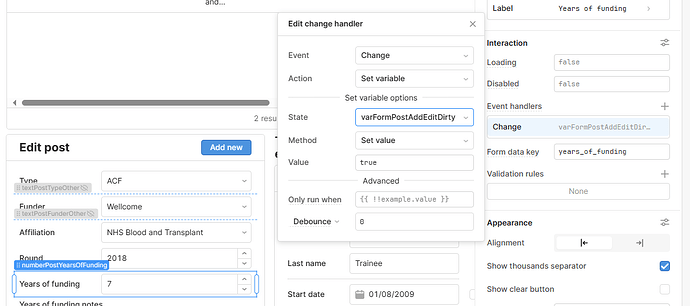
Retool doesn't have a built-in isDirty property for form fields the way frameworks like React Hook Form do. If you need to detect dirty form fields in Retool — meaning you want to know whether a user has changed any input values since the form loaded — you'll need to wire it up yourself using Temp State variables. It's not complicated once you know the pattern, and this guide will walk you through two proven approaches from the Retool community.
What Does "Dirty" Mean in a Form?
A form field is considered dirty when its current value differs from the value it had when the form first loaded. This is a standard concept in UI development — frameworks like React Hook Form, Angular, and others expose an isDirty flag automatically. In Retool, editable tables handle this for you natively, but standalone form inputs do not. That means if a user edits a record in a form and then accidentally closes a modal or navigates away, there's no built-in guardrail to warn them.
Approach 1: Compare Concatenated Field Values with Temp State
The simplest and most reliable approach is to snapshot the original record values into a Temp State variable when the form loads, then compare that snapshot against the current input values in real time. Here's how to set it up:
- Step 1: Create a Temp State variable called
formDirtyCache1. Set its default value to a concatenation of all the original field values from your data source. If your source is a selected table row, it looks like this:
{{tblProducts.selectedRow.data.product_name + tblProducts.selectedRow.data.town_id + tblProducts.selectedRow.data.price + tblProducts.selectedRow.data.product_description + moment(tblProducts.selectedRow.data.last_inventory_check).format('YYYY-MM-DD')}}
- Step 2: Create a second Temp State variable called
formDirtyCache2. Set its value to a concatenation of the current form input values:
{{txtProductName.value + selTown.value + txtPrice.value + txtDescription.value + moment(dtInventoryCheck.value).format('YYYY-MM-DD')}}
- Step 3: On your Save button, use the Disable When property to disable it when no changes have been made:
{{formDirtyCache1.value == formDirtyCache2.value}}
- Step 4 (optional): If you need to reference dirty state in multiple places, create a third Temp State variable called
formDirtyto keep things DRY:
{{formDirtyCache1.value != formDirtyCache2.value}}
Important note on dates: Date fields are a common gotcha. A table row and a datetime picker may return dates in different formats, so you must normalize them before comparing — that's why moment().format('YYYY-MM-DD') is applied to both sides of the comparison.
Approach 2: Per-Field Change Handlers with an IsDirty Flag
If you want more granular control — for example, tracking which specific field changed or triggering behavior on individual field edits — you can use event handlers on each input component instead.
- Step 1: Create a Temp State variable called
IsDirtywith a default value of0. - Step 2: On each form input, add an onChange event handler that compares the current field value against the original loaded value and sets
IsDirtyaccordingly. For a field calledTitle:
{{( formQuery1.data.Title.toString() != Title.value ? 1 : 0 )}}
- Step 3: Use
IsDirtyto control what happens when a user tries to close a modal. Since Retool's default modal close button can't easily be intercepted, hide it with CSS:
span.ant-modal-close-x { display: none; }
- Step 4: Add your own Close button inside the modal. In its click handler, check the dirty flag before closing:
if( IsDirty.value == '1'){ modalWarn.open(); } else { modal1.close(); }
This pattern gives you a warning modal that fires only when unsaved changes exist, and a clean close when the form is untouched.
Which Approach Should You Use?
Use Approach 1 (concatenated Temp State comparison) when you want a simple, low-maintenance solution and just need to enable or disable a Save button. It's fast to implement and easy to read. Use Approach 2 (per-field onChange handlers) when you need to intercept modal closures, trigger warnings, or track dirty state at the individual field level. It takes more setup but gives you finer control over the user experience.
Is Native Dirty State Tracking Coming to Retool?
As of now, Retool does not natively expose an isDirty property on form inputs the way it does for editable tables. The Retool community has flagged this as a feature request, and it remains a common pain point for teams building data-editing interfaces. Until it lands natively, the Temp State comparison patterns above are the go-to workaround used in production Retool apps today.
If you're building a lot of edit forms in Retool, consider abstracting the dirty-check logic into a reusable formDirty Temp State variable from the start — your future self will thank you.
Ready to build?
We scope, design, and ship your Retool app — fast.