Guides
How to Copy Queries Between Retool Apps (And What to Do Now)
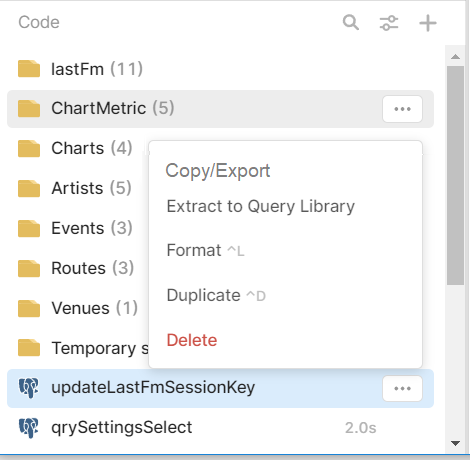
If you've ever tried to copy queries between Retool apps, you already know the frustration. You prototype something in one app, get the queries working perfectly — complete with transformers, onSuccess handlers, and custom configs — and then you need to move them to a production app. There's no native "copy query to another app" button, so most people end up manually recreating everything from scratch. Here's what actually works right now, and what Retool has signaled is coming.
Why Moving Queries Between Retool Apps Is Painful
The core problem is that Retool queries aren't standalone objects you can drag and drop between apps. They're embedded in the app's JSON state, tightly coupled to resource connections, transformers, event handlers, and component bindings. When you're splitting one large app into two, or promoting a prototype to a production app, you have to manually recreate every query — and it's easy to miss settings like Run when page loads, queryTimeout, enableTransformer, or requireConfirmation. Miss one and you've got a subtle bug that surfaces at the worst possible time.
Method 1: Export the Entire App as JSON (Best for Full Migrations)
Retool's built-in export feature exports the entire app as a JSON file — and that JSON includes all of your queries. This is the closest thing to a native solution available today.
- In the Retool app editor, go to the app settings or the top menu and select Export app to download the JSON file.
- Open the JSON and locate the
pluginsobject — this contains every query in the app, including their full configuration: query body, resource name, transformer code, event handlers, and all toggle settings. - To transplant specific queries into another app, export the target app as JSON as well, then manually merge the relevant query objects from the source JSON into the target JSON's
pluginsmap. - Re-import the modified JSON into Retool. Make sure the resource names match exactly — Retool uses
resourceNameto reconnect queries to their data sources on import. If the resource names differ, the queries will import but won't be connected.
Caveat: This is JSON surgery. It works, but it's error-prone if you're not comfortable editing raw JSON. Always keep a backup of both app JSONs before merging.
Method 2: Use the Retool Query Library (Best for Reusable Queries)
If you have queries that you want to share across multiple apps — not just migrate once — the Query Library is the right tool. The Query Library lets you save a query centrally and import it into any app in your Retool organization.
- Open the query you want to share in the query editor.
- Save it to the Query Library via the query settings panel.
- In any other app, create a new query and select Import from Query Library.
- Imported queries are read-only by default — you can override inputs but not edit the core query logic from within the consuming app.
This is ideal for shared database queries, reusable API calls, or utility JavaScript queries like data formatters. It's not ideal for one-off migrations, since it adds ongoing coupling between apps and the library.
Method 3: Manual Copy-Paste (The Reality for Most Teams)
For many Retool builders, the current reality is manual copy-paste. It works, but as the Retool community thread that inspired this post makes clear, it's "quite vexatious to the spirit" — especially when you're moving a dozen queries and have to carefully reconstruct every transformer, every onSuccess event, and every disabled-query toggle by hand.
If you must go manual, here's a checklist to avoid missing critical settings on each query:
- Query body — SQL, REST endpoint, GraphQL body, or JavaScript code
- Transformer — check
enableTransformerand copy the full transformer code - Error transformer — often overlooked; check
enableErrorTransformer - Event handlers —
onSuccess,onFailure, and any chained query triggers - Run behavior —
runWhenPageLoads,runWhenModelUpdates, and their delay settings - Confirmation dialogs —
requireConfirmationandconfirmationMessage - Timeout and throttle —
queryTimeoutandqueryThrottleTime - Notifications —
showSuccessToaster,showFailureToaster, custom messages - Caching —
enableCachingandcacheKeyTtl
What Retool Is Building for Query Reusability
The good news: Retool's own team has acknowledged this gap. In the community thread, a Retool product team member confirmed that query reusability is a top theme for their roadmap, with significant work being done on how queries can be shared, imported, and managed across apps. While there's no released feature yet that lets you copy individual queries from app to app with a single click, it's clearly on the way.
In the meantime, the JSON export method combined with the Query Library covers most real-world use cases — especially if your team standardizes resource names across your Retool organization, which makes JSON-based migrations significantly less painful.
The Recommended Workflow for Retool Agencies and Power Users
If you're regularly building multiple apps that share query logic — a common pattern for Retool agencies — here's the approach that minimizes duplication pain:
- Standardize resource names across all apps in your organization so JSON exports are always portable.
- Put shared, stable queries into the Query Library early — before they're embedded in three different apps.
- Use JSON export for one-time migrations when splitting or promoting apps, and keep a naming convention that makes it easy to identify query objects in the raw JSON.
- Document your query configs — even a simple Notion table listing each query's key settings saves hours when you need to rebuild manually.
None of these workarounds are as fast as a native "copy query to app" dialog, but until Retool ships that feature, they're the most reliable options available. Watch the Retool community thread for updates as the reusability roadmap evolves.
Ready to build?
We scope, design, and ship your Retool app — fast.