Tutorials
How to Build a JSON Diff Viewer in Retool
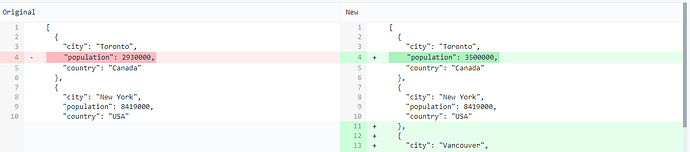
If you've ever needed to compare two JSON objects in Retool — say, a before-and-after snapshot of a record, or two versions of a config — you've probably noticed there's no native JSON diff component. The good news is that knowing how to build a JSON diff viewer in Retool is easier than it looks, and the community has already done most of the heavy lifting. This post walks you through two battle-tested approaches using third-party JavaScript libraries that you can drop into any Retool app today.
Why Retool Doesn't Have a Native JSON Diff Component (Yet)
This has been a recurring request in the Retool community forum since at least 2022. The Retool team has acknowledged the feature ask and added community upvotes to an internal backlog, but as of now it hasn't been prioritized. That means if you need a diff viewer — a side-by-side, human-readable comparison of two JSON objects — you're building it yourself. Fortunately, Retool's ability to import external JavaScript packages and render custom HTML makes this very doable.
Approach 1: jsondiffpatch in a JS Query + HTML Component
This is the quickest path to a working diff viewer. It uses the jsondiffpatch library, which diffs two JSON objects and can output the result as formatted HTML.
Step 1: Import the jsondiffpatch library. In your Retool app, go to Settings → Libraries and add the following CDN URL:
https://cdnjs.cloudflare.com/ajax/libs/jsondiffpatch/0.4.1/jsondiffpatch.umd.min.js
Step 2: Create a JS query. Add a new JavaScript query (e.g. named diffJSON) and paste in the following logic. Replace tfrEntityBeforeXMLtoJSON.value and tfrEntityAfterXMLtoJSON.value with whatever two objects you're comparing — these could be temporary state variables, query results, or transformer outputs:
var a = beforeState.value;var b = afterState.value;var delta = jsondiffpatch.diff(a, b);if (delta == null) { return "Nothing to compare or there are no differences.";} else { return jsondiffpatch.formatters.html.format(delta);}
Step 3: Render the output in an HTML component. Drag an HTML component onto your canvas and set its content to {{diffJSON.data}}. The jsondiffpatch HTML formatter produces a color-coded diff table out of the box. Added, removed, and modified values are visually distinct.
A note on CSS: The HTML formatter outputs semantic class names but relies on the jsondiffpatch stylesheet to render colors correctly. If the diff looks unstyled, you'll need to inject the matching CSS. You can do this by prepending a <style> block inside your HTML component's content, pulling styles from the jsondiffpatch GitHub repo.
Approach 2: jsdiff + diff2html (More Polished Output)
The Retool team shared a community resource that combines jsdiff for computing the diff with diff2html for rendering it in a clean, GitHub-style side-by-side view. This approach produces a more visually polished result and is worth the extra setup if your users will be looking at diffs regularly.
- Import both
jsdiffanddiff2htmlvia their CDN URLs in Settings → Libraries - Use a JS query to stringify both JSON objects, run them through
Diff.createPatch(), and pass the unified diff string todiff2html.html() - Render the resulting HTML in a Retool HTML component
- Inject the
diff2htmlCSS either via a CDN<link>tag inside the HTML component or as a custom library stylesheet
The Retool community has a downloadable .json app export that implements this pattern end-to-end. If you search the Retool community forum for "diff_viewer" you should be able to find and import it directly.
How to Pass Diff Results to Other Parts of Your App
One of the most useful things about both approaches is that the raw delta — not just the HTML — is available for downstream use. With jsondiffpatch, jsondiffpatch.diff(a, b) returns a plain JavaScript object representing the changes. You can store this in a tempState variable and reference it in other queries or components.
- Use
{{ diffJSON.data }}in an HTML component for visual rendering - Store the raw delta in a temporary state variable to filter, iterate, or pass to a write-back query
- Feed the delta into a Table component if you flatten it into an array of changed fields
When to Use Each Approach
- jsondiffpatch alone — best for quick internal tools where speed of implementation matters more than visual polish
- jsdiff + diff2html — best for tools where the diff view is a primary feature, such as audit log viewers, config change reviewers, or data validation dashboards
- Custom Component — if you need full control over the UI, Retool's custom component sandbox lets you mount any React-based diff library (like
react-diff-viewer) directly
Bottom Line
Until Retool ships a native JSON diff component, importing jsondiffpatch via the Libraries panel and rendering its HTML output is the fastest way to get a working, human-readable diff view in your app. It takes less than 30 minutes to set up, requires no backend changes, and the raw delta is available for programmatic use anywhere in your Retool app. If your use case demands a more polished UI, the jsdiff + diff2html combination is a straightforward upgrade. Either way, you don't have to wait for a native component to ship a great diff experience today.
Ready to build?
We scope, design, and ship your Retool app — fast.